

A smart home is a residence that uses connected technology to help homeowners monitor, control, and manage different parts of their living environment.
That can include lighting, security, climate control, entertainment, appliances, sensors, and other connected systems. Some devices may be controlled through applications or voice interfaces, while others can participate in routines or interact with compatible technologies.
A smart home can begin with only one connected device, but a broader smart home experience develops as homeowners add technology that supports real household needs and fits into a manageable connected environment.
For beginners, understanding the broader system before choosing devices can make later decisions easier. Homeowners who want a practical implementation process can explore how to set up a smart home for more detailed planning guidance.
This guide explains what a smart home is, how smart home technology works, the systems commonly involved, the benefits and challenges of connected living, and what homeowners should consider before building or expanding a smart home.
What Is a Smart Home?
A smart home is a residence in which connected devices and systems provide digital control, monitoring, communication, or automation for selected household functions.
A traditional device generally performs its function independently. A conventional light switch controls a light directly, while a standard thermostat allows temperature changes from the device itself.
Smart technology adds connectivity.
A smart light may be controlled from an application. A connected thermostat may provide remote access or scheduling. A smart lock may allow supported digital access controls, while connected cameras or sensors may provide information about activity around the home.
The important distinction is that a smart home is broader than any one product.
A smart home ecosystem can include devices, communication technologies, applications, controllers, automation routines, and user interfaces. The exact combination depends on what the homeowner wants the technology to accomplish.
For that reason, a smart home should be viewed as an evolving system rather than a one-time purchase. Some homeowners begin with one useful device, while others gradually build a larger connected environment as their needs become clearer.
How Does Smart Home Technology Work?
Smart home technology works by allowing compatible devices and systems to exchange information, receive commands, and perform supported actions through connected platforms or control methods.
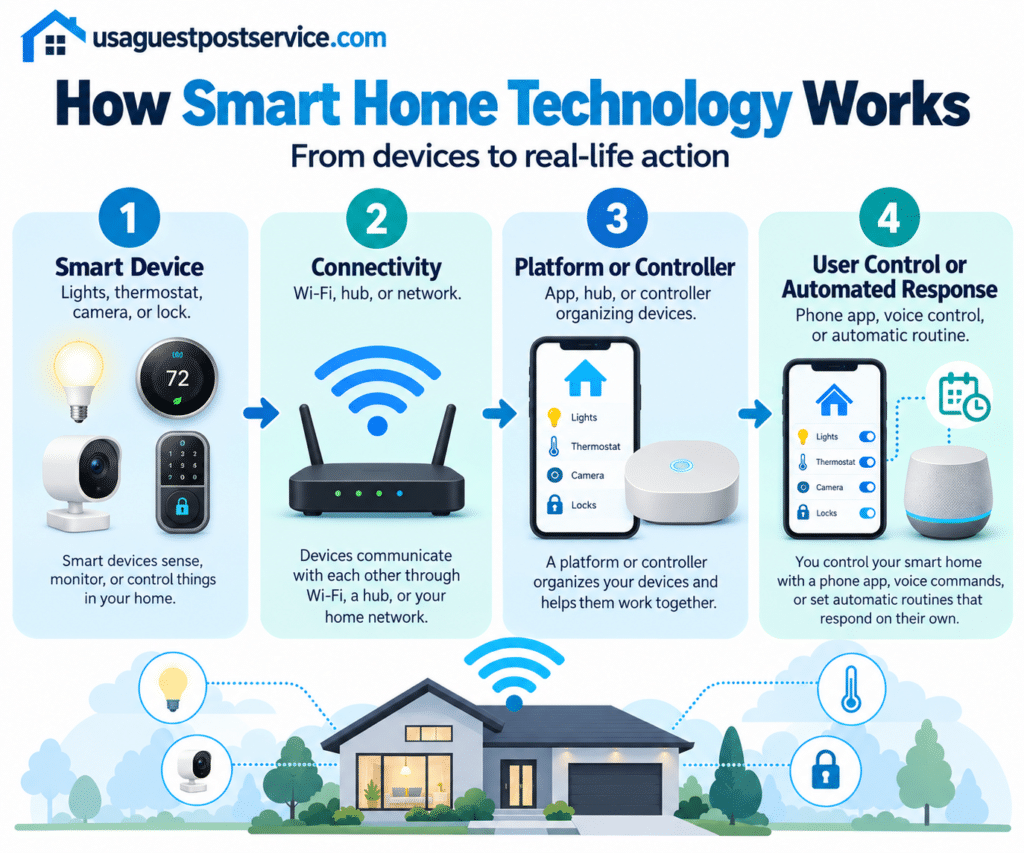
A simple way to understand the structure is:
Smart Device → Connectivity → Platform or Controller → User Control or Automated Response
Each layer performs a different role.
Smart Devices
Smart home devices perform the physical functions within the system.
Examples may include lights, locks, thermostats, cameras, speakers, sensors, plugs, appliances, and other connected products.
A device can still be useful on its own. The wider smart home experience develops when that product can participate in a broader control or communication environment.
Connectivity
Connected devices need a supported method for communicating.
Depending on the product, this may involve Wi-Fi, other supported wireless technologies, hubs, bridges, controllers, or cloud-based services.
Not every device communicates in the same way, and different technologies do not automatically work together simply because they are marketed as “smart.”
Compatibility therefore matters at both the device and system level.
Platforms and Controllers
A platform or controller helps organize supported devices and functions.
Depending on the ecosystem, it may provide device management, common controls, scenes, routines, notifications, or integrations between different products.
Some homes use dedicated hubs or controllers, while others rely primarily on applications, cloud services, or a combination of technologies.
User Controls
Homeowners need a practical way to interact with their smart home.
Common control methods include mobile applications, physical controls, voice interfaces, touchscreens, and centralized panels.
The best control method is the one that household members can understand and use reliably.
Automation
Automation allows connected devices to respond automatically to schedules, sensors, conditions, or other supported events.
For example, a compatible light may turn on automatically when motion is detected after sunset.
Automation is one capability within the wider smart home ecosystem rather than the definition of a smart home itself.
For a deeper explanation of triggers, conditions, actions, and routines, our smart home automation guide covers that topic separately.
Common Smart Home Technologies and Systems
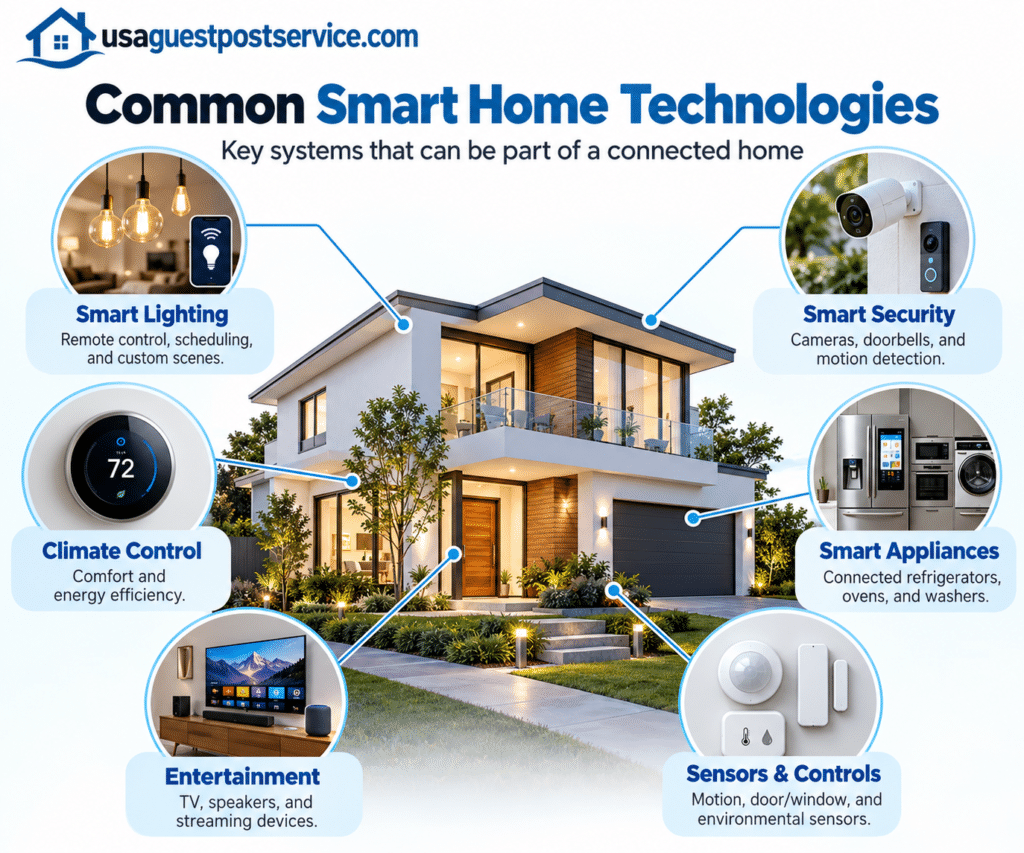
A smart home may contain many different categories of connected technology.
The right combination depends on household goals, existing infrastructure, preferred control methods, and how much integration or automation the homeowner actually wants.
Smart Lighting
Smart lighting is one of the most common entry points into connected-home technology.
Depending on the products used, homeowners may be able to turn lights on or off remotely, adjust brightness, create scenes, set schedules, or connect lighting with supported sensors and automation routines.
The value is not simply replacing conventional bulbs with connected ones. Smart lighting becomes more useful when it solves a specific need, such as easier control, scheduled lighting, or coordinated room settings.
Smart Security Systems
Smart security technology may include cameras, video doorbells, smart locks, contact sensors, motion sensors, and other connected devices.
These products can provide additional monitoring, access controls, or notifications depending on their capabilities and configuration.
However, connected security devices should be treated as part of a broader security approach rather than as a guarantee of safety. Device security, account protection, privacy settings, network reliability, and responsible use all matter.
Smart Climate Control
Smart thermostats and other connected climate devices can provide additional ways to manage temperature and comfort.
Homeowners may use applications or connected controls to review settings, make adjustments, create schedules, or use supported automation.
The results depend on the thermostat, HVAC system, home design, configuration, and household habits.
Smart climate technology can improve control and convenience, but it should not be assumed to guarantee energy savings in every home.
Smart Appliances
Connected appliances extend smart technology into everyday household tasks.
Depending on the product, an appliance may provide status information, notifications, remote controls, maintenance alerts, or other connected features.
Examples can include refrigerators, washing machines, ovens, kitchen appliances, and other compatible equipment.
Not every appliance needs to be connected for a home to benefit from smart technology. The value depends on whether the connected features solve a meaningful household need.
Smart Entertainment Systems
Entertainment systems can also be part of a connected home.
Smart televisions, speakers, streaming devices, receivers, and multi-room audio systems may provide app-based controls, voice interaction, or integration with other supported technologies.
The main benefit comes from making entertainment easier to access and coordinate.
Sensors and Connected Controls
Sensors help smart home systems understand what is happening in or around the home.
Motion, contact, temperature, light, occupancy, and environmental sensors can provide information that other connected functions may use.
Physical switches, touch interfaces, applications, voice controls, and centralized panels can then provide different ways for homeowners to interact with those systems.
How Different Smart Home Technologies Work Together
Individual smart devices can provide useful features, but larger smart homes often become more useful when compatible technologies can communicate or be managed through a coordinated environment.
For example, lighting, security, climate control, and entertainment may each perform separate functions while still being available through the same broader ecosystem.
This relationship is where home technology integration becomes important.
Integration focuses on connecting compatible systems so they can communicate, share information, or participate in common controls and routines.
Homeowners who want to understand this area in more detail can read our home technology integration guide.
The important point is that integration should serve a practical purpose. Not every device needs to interact with every other device.
Benefits of Smart Home Technology
Smart home technology can provide several practical benefits, but the value depends on the products selected, how they are configured, and whether they address actual household needs.
Greater Convenience and Control
Connected technology can give homeowners additional ways to manage household functions.
Instead of physically interacting with every device, a homeowner may be able to adjust supported lighting, climate settings, access controls, or entertainment functions through an application, voice interface, or centralized control method.
This flexibility can reduce repetitive tasks and make frequently used functions easier to manage.
Remote Access and Monitoring
Some smart devices allow homeowners to view information or control supported functions while away from home.
Examples may include checking a camera, reviewing device status, adjusting a thermostat, or receiving notifications from supported sensors.
Remote access can provide additional visibility, but it depends on the device, account configuration, connectivity, and services involved.
Comfort and Personalization
Smart home systems can also make it easier to adjust a living environment around household preferences.
Lighting scenes, climate schedules, entertainment settings, and other connected functions may be configured differently for mornings, evenings, work periods, or other routines.
The value comes from making technology better reflect how the household actually uses the home.
Better Home Management
As the number of connected devices grows, a coordinated system can make it easier to understand what is happening across the home.
Homeowners may be able to view device status, manage common settings, receive notifications, or access several compatible systems through one environment.
For larger setups, a smart home control panel may provide a centralized interface for managing selected connected functions.
Energy Management Support
Some smart technologies can provide additional visibility or control over energy-related household functions.
Smart thermostats, connected lighting, plugs, and energy-monitoring products may help homeowners understand usage or adjust selected systems more conveniently.
However, connected technology does not automatically reduce energy costs. Results depend on the products, home conditions, user behavior, and how the technology is configured.
The more defensible benefit is improved awareness and control.
Accessibility and Flexible Control
Connected technology may also give household members additional ways to interact with their environment.
Voice interfaces, remote controls, automation routines, and centralized management can provide alternatives to traditional physical controls.
Which features are useful depends on the individual household and the products being used.
Challenges and Considerations Before Building a Smart Home
Connected technology can be useful, but it also introduces planning, compatibility, privacy, network, and maintenance considerations.
Understanding these limitations before adding more devices can help prevent a smart home from becoming harder to manage than the traditional systems it was meant to improve.
Device Compatibility
Not every smart device works with every platform, controller, or other product.
Compatibility may depend on the ecosystem, communication technology, product generation, software support, and the specific feature being used.
A device can work perfectly on its own and still be a poor choice for a larger system if it cannot participate in the integrations the homeowner wants.
Compatibility should therefore be checked before purchase rather than after multiple systems have already been installed.
Privacy and Data
Connected devices may collect or process different types of information depending on their functions.
Cameras may process video, voice assistants may process spoken commands, sensors may record environmental or activity-related information, and applications may store account or device data.
Homeowners should understand what information a product uses, which settings are available, who has account access, and how permissions can be managed.
Network and Connectivity Requirements
Many smart home features depend on reliable communication.
Network coverage, router placement, device requirements, supported communication technologies, and the location of installed products can all influence performance.
A fast internet connection alone does not guarantee reliable smart-home communication if coverage or local network conditions are poor where devices are installed.
Technology Complexity
A few connected devices may be straightforward to manage.
A larger ecosystem can introduce more applications, accounts, settings, integrations, updates, and troubleshooting requirements.
The objective should be to simplify household management rather than add unnecessary complexity.
Maintenance and Updates
Smart devices are not necessarily “set and forget” products.
Applications, devices, hubs, controllers, and network equipment may receive software or firmware updates. Accounts and permissions may also need periodic review.
Homeowners should consider whether they are comfortable maintaining the system as it grows.
What Affects the Cost of a Smart Home?
There is no single price for creating a smart home because the scope can range from one or two consumer devices to a larger system involving several rooms and multiple categories of technology.
The most useful way to think about cost is in terms of scope and complexity.
Number of Devices
A small setup with several connected lights or plugs has very different equipment and configuration requirements from a whole-home system.
As more devices are added, equipment costs, setup time, management requirements, and integration needs can increase.
Technology and System Complexity
Simple standalone devices may require minimal planning.
A more advanced smart home may include several platforms, security systems, climate control, entertainment equipment, centralized controls, integration, and automation.
The relationships between those systems can influence complexity as much as the number of individual products.
Existing Infrastructure
The home’s network, wiring, electrical systems, HVAC equipment, layout, and existing connected technology can affect how easily new devices are added.
Some projects may require little preparation, while others may need additional network, electrical, or system work before the intended technology can be installed.
Professional Installation
Some homeowners can install and configure straightforward consumer devices themselves.
Professional help may become more relevant when the project involves multiple technologies, difficult integrations, specialist electrical or HVAC work, network planning, or a larger whole-home system.
Our smart home installation services guide explains what installation may involve and when professional support can be useful.
How Can Beginners Start With Smart Home Technology?
A smart home does not need to be created all at once.
For beginners, a gradual approach is usually easier to understand and manage.
Start With One Clear Goal
Before buying devices, decide what problem you want the technology to solve.
That might be easier lighting control, better visibility of an entry point, more convenient temperature management, or simpler control of frequently used household functions.
A specific goal makes device selection easier than trying to “make the whole house smart” immediately.
Choose Compatible Technology
Once the goal is clear, select products that can support it and fit the broader ecosystem you are likely to use.
Check platform compatibility, network requirements, required hubs or controllers, and whether the product can participate in future integrations that matter to you.
Start Small and Test
Begin with one or two useful devices or systems.
Learn how they behave, how they are controlled, and whether the connected features actually improve daily life.
Testing a smaller setup also makes it easier to identify compatibility or connectivity issues before the home becomes more complex.
Expand Gradually
Add new technology only when there is a clear reason.
A homeowner might begin with lighting, then later add climate control, security devices, sensors, entertainment, or other systems.
For a more detailed implementation process, our how to set up a smart home guide covers device planning, compatibility, connectivity, and system setup.
Advanced Smart Home Capabilities
As homeowners become more familiar with connected technology, they may begin exploring automation, integration, and centralized controls.
These are more specialized parts of the wider smart home ecosystem.
Smart Home Automation
Smart home automation allows compatible devices to respond automatically to triggers, schedules, conditions, or programmed rules.
For example, a compatible light might turn on automatically when motion is detected after sunset.
For a deeper explanation of routines, triggers, conditions, and actions, see our smart home automation guide.
Home Technology Integration
Home technology integration focuses on how compatible technologies communicate and work together.
This becomes more important when homeowners want lighting, security, climate control, entertainment, and other systems to operate within a coordinated environment.
Our home technology integration guide covers compatibility, communication, platforms, controllers, and system relationships in more detail.
Smart Home Control Systems
As a smart home expands, control can become an important design consideration.
Some households may be comfortable using individual applications, while others may prefer a more centralized way to access common functions.
Control options may include mobile apps, voice interfaces, physical controls, touchscreens, or dedicated control panels.
The purpose of centralized control is to make the connected environment easier for household members to understand and manage.
Frequently Asked Questions About Smart Homes
What makes a home a smart home?
A home becomes a smart home when connected devices or systems provide digital control, monitoring, communication, or automation for selected household functions.
A smart home can begin with one device, but a broader ecosystem develops as more compatible technologies are added and coordinated.
Do smart homes require internet access?
Not every smart-home function necessarily depends on internet access, but many connected products use internet connectivity for features such as remote access, cloud services, account functions, notifications, or updates.
The exact requirements depend on the device and system architecture.
Can I start a smart home with only one device?
Yes.
Many homeowners begin with one useful connected product and expand only after they understand how the technology fits into their routines.
Starting small can also reduce unnecessary purchases and make compatibility planning easier.
Is a smart home the same as home automation?
No.
A smart home is the broader ecosystem of connected devices, systems, controls, and technologies.
Home automation is one capability within that ecosystem. It allows supported devices to perform actions automatically according to programmed triggers, conditions, schedules, or rules.
Do all smart home devices work together?
No.
Smart devices may support different platforms, communication technologies, controllers, ecosystems, and features.
Compatibility should be verified for the specific devices and functions the homeowner wants to use.
Does every smart home need a hub?
No.
Some products communicate directly through supported network or platform technologies, while others require hubs, bridges, or controllers.
Whether a hub is necessary depends on the products and ecosystem being used.
Are smart homes expensive?
The cost varies considerably.
A small setup with several consumer devices may be relatively modest, while a larger connected environment involving multiple rooms, integration, specialist equipment, or professional installation can cost substantially more.
The number of devices, system complexity, infrastructure, and installation requirements all affect the final investment.
Can a smart home be expanded later?
In many cases, yes.
A gradual approach is often practical, provided new products are compatible with the existing system.
Planning for realistic future needs from the beginning can make later expansion easier.
Conclusion: Understanding the Smart Home Ecosystem
A smart home is a broader ecosystem in which connected devices, communication technologies, platforms, controls, integration, and automation can work together to make selected household functions easier to manage.
The strongest smart homes are built around clear household needs, compatible technology, reliable communication, and controls that people can actually understand.
Beginners do not need to automate an entire property immediately. Starting with one useful goal, choosing suitable technology, testing it, and expanding gradually is usually a more manageable approach.
As the system grows, more specialized topics such as setup, automation, integration, centralized controls, and professional installation become relevant. The foundation remains the same: smart technology should make the home more useful and manageable, not simply more complicated.