

Smart home installation services help homeowners plan, connect, configure, and integrate compatible smart devices as part of a coordinated connected-home system.
Installing a single smart bulb or speaker is usually straightforward. Building a complete smart home is different because several devices, platforms, network connections, and automation routines may need to work together reliably.
A successful smart home setup therefore involves more than placing devices around a property. It requires understanding household goals, choosing compatible technology, preparing the home network, configuring devices correctly, testing the system, and creating automation that serves a practical purpose.
For homeowners who are still planning their first connected-home project, understanding how to set up a smart home can provide useful context before selecting devices or deciding whether professional installation is necessary.
This guide explains what smart home installation services include, how the installation process works, which systems may be involved, when DIY setup can be practical, and when professional support may be useful.
What Are Smart Home Installation Services?
Smart home installation services involve setting up connected devices and integrating them so they can operate as part of a broader smart home system.
The scope of a project can vary significantly. One homeowner may only need help installing a thermostat or configuring several smart lights, while another may want lighting, security, climate control, sensors, entertainment equipment, and automation routines connected through one coordinated platform.
A typical connected home may involve four core elements: smart devices, a compatible platform or controller, reliable network connectivity, and automation rules that define how devices respond.
The purpose of a smart home installation service is not simply to increase the number of connected products in a property. It is to create a system in which selected technologies work together in a way that is practical, understandable, and manageable.
Smart Devices vs Complete Smart Home Systems
A smart device performs a specific connected function. A complete smart home system coordinates multiple devices and functions through compatible technology.
For example, a smart light may be controlled independently through an app. That is useful, but it does not automatically mean the lighting is integrated into a broader connected home system.
A more complete setup might allow that light to respond to a motion sensor, follow a schedule, participate in an evening scene, or work alongside other compatible devices.
This distinction matters because buying several smart products does not automatically create effective smart home integration. The devices also need to work with the intended platform, network environment, automation rules, and other connected systems.
A well-planned connected home system therefore focuses on how individual technologies relate to one another rather than simply how many products have been installed.
How Do Smart Home Systems Work Together?
Smart home systems work together by passing information and commands between compatible devices, communication systems, platforms or controllers, and user interfaces.
The important point is that integration is a process. One part of the system detects an event or receives a command, that information travels through a supported communication method, and the appropriate platform or controller determines what should happen next.
A simple way to understand the process is:
Device or Sensor → Communication → Platform or Controller → Response or User Control
For example, a motion sensor may detect activity in a hallway. The event is communicated to the connected platform or controller, which evaluates the configured relationship between the devices. Depending on the setup, the homeowner may receive a notification, a compatible light may respond, or the event may simply appear within the control interface.
The exact sequence varies between smart home systems, but effective integration depends on each part being able to communicate through supported technologies.
Device Events and Commands
An integrated interaction usually begins with an event or a command.
A sensor may detect movement, a thermostat may report a temperature change, a homeowner may adjust a setting through an application, or a control panel may send a request to a connected device.
That information provides the starting point for whatever interaction the system has been configured to support.
Communication Between Systems
Once an event or command occurs, the relevant information needs a supported way to move between devices and systems.
Depending on the products involved, communication may use the home network, dedicated wireless technologies, hubs, bridges, controllers, cloud services, or a combination of these methods.
Reliable communication is important because devices may work correctly on their own while still failing to participate effectively in a wider integration if the connection between systems is unreliable or unsupported.
Platform or Controller Coordination
A platform or controller helps determine how compatible technologies should interact.
It may coordinate devices, make supported information available across systems, manage scenes, or allow one connected event to influence another function.
For example, a platform may associate information from a security sensor with a compatible lighting function. The platform does not replace either device; it provides the coordination that allows them to participate in the same connected environment.
User Interaction and System Response
The final part of the process is the resulting device response or interaction with the homeowner.
A light may change state, a climate setting may be adjusted, a notification may appear, or system information may become available through an app, voice interface, or centralized control panel.
A useful integration should make these interactions predictable and understandable rather than adding unnecessary complexity.
Key Components of a Home Integration System
A home integration system is built from several functional layers. Each one has a different responsibility within the connected environment.
Although the exact architecture varies between homes, most systems rely on four broad components: connected devices, communication infrastructure, an integration platform or controller, and a user control interface.
Connected Devices and Sensors
Connected devices perform actions or provide information within the home.
These may include smart lights, thermostats, locks, cameras, environmental sensors, connected appliances, entertainment equipment, and other compatible technologies.
Their individual features are important, but integration also depends on whether they support the platform, controller, communication method, and functions required by the wider system.
A capable smart device may still be a poor integration choice if it cannot participate in the relationships the homeowner wants to create.
Connectivity Infrastructure
Connectivity infrastructure provides the communication foundation for the integrated system.
This can include the home network as well as supported wireless technologies, hubs, bridges, controllers, or other communication equipment required by particular devices.
Coverage, reliability, device placement, and system capacity can all affect how effectively connected technologies communicate.
As the system grows, these factors should be considered across the whole home rather than evaluating connectivity one device at a time.
Integration Platform or Controller
The integration platform or controller helps coordinate supported devices and systems.
Depending on the architecture, it may provide device management, communication between technologies, scenes, automation support, integrations, or access to several functions through a common environment.
Not every smart home uses a dedicated central controller. Some systems distribute these responsibilities across hubs, applications, cloud services, or other supported technologies.
The appropriate approach depends on the devices being connected and the functions the homeowner actually needs.
Control Interface
The control interface is how household members interact with the connected system.
This may be a mobile application, physical control, voice interface, touchscreen, or centralized control panel.
A good interface should make the integrated system easier to understand rather than exposing unnecessary technical complexity.
For homeowners who want a centralized way to manage several compatible systems, our smart home control panel guide explains how dedicated control interfaces can provide access to lighting, climate, security, automation, and other connected functions.
The best control method is the one that gives household members convenient access to the functions they actually use while keeping the system understandable and manageable.
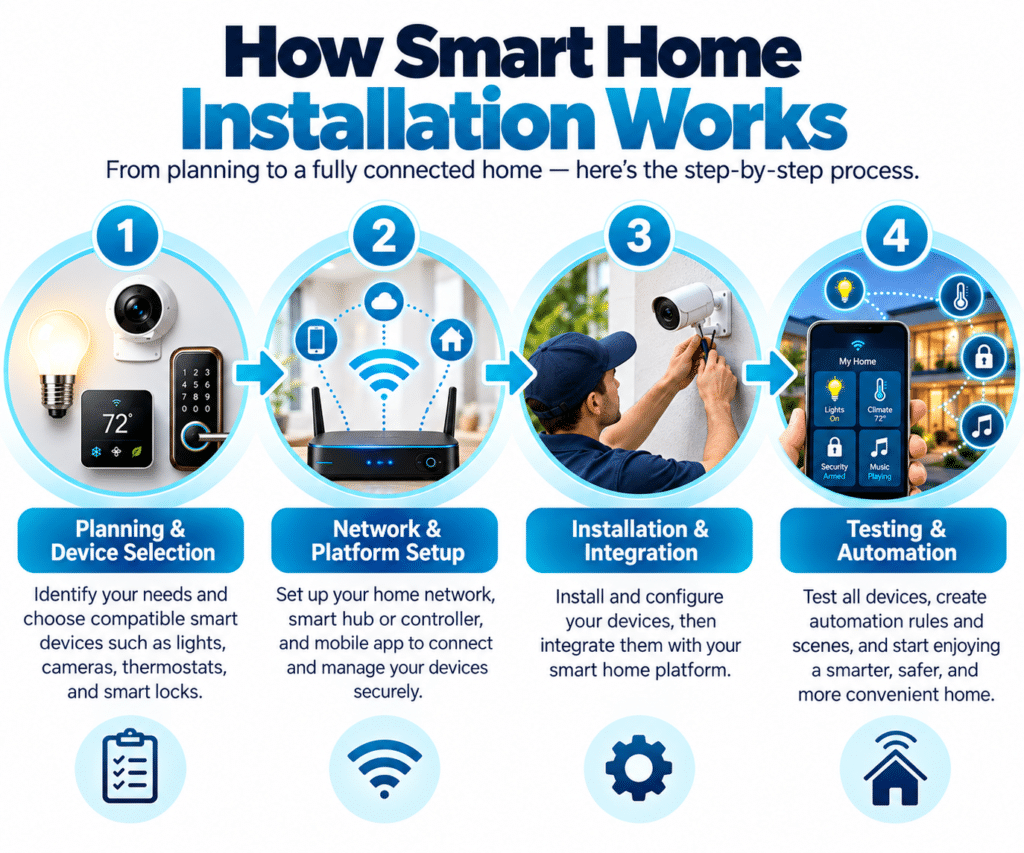
What Systems and Devices Can Be Included in a Smart Home Installation?
The devices included in a smart home installation depend on household goals and the capabilities of the selected platform.
Some projects focus on one area, such as lighting or climate control. Others combine several systems into a broader home automation installation.
Smart Lighting Systems
Smart lighting is a common starting point because it can support both manual control and automation.
Depending on the products being used, homeowners may be able to adjust brightness, create scenes, set schedules, or connect lighting with sensors and other supported triggers.
A smart lighting installation becomes more useful when it is planned around actual household routines rather than simply replacing conventional bulbs with connected alternatives.
Smart Security Devices
A smart home system may include cameras, door or window sensors, smart locks, video doorbells, motion sensors, and related security technologies.
These products can provide information, notifications, and selected access controls through compatible platforms.
However, smart home security should be understood as a broader system than simply installing connected cameras or locks. Account security, device permissions, network management, and privacy settings also affect how safely the system is used.
Smart Climate Control
Connected thermostats and compatible climate devices can be integrated into a smart home system to provide centralized or automated temperature management.
A smart thermostat installation may involve confirming compatibility with the existing HVAC system, configuring the device, connecting it to the preferred platform, and setting up schedules or supported automation.
The exact capabilities depend on the equipment and system being used.
Smart Speakers and Voice Assistants
Voice assistants and smart speakers can provide another way to interact with supported devices.
Depending on the ecosystem, homeowners may use voice commands to control lighting, climate settings, scenes, entertainment functions, or other compatible devices.
They should be treated as one possible interface within the system rather than as the entire smart home platform.
Smart Sensors and Automation Devices
Sensors help connected systems respond to events and conditions.
Motion sensors, contact sensors, temperature sensors, and other compatible devices can provide information that automation routines use when deciding whether an action should occur.
These components can make a connected home more responsive because the system no longer depends entirely on manual commands.
DIY Smart Home Setup vs Professional Installation
Not every smart home project requires professional support.
Many consumer devices are designed for straightforward setup, and homeowners may be comfortable configuring basic smart lighting, plug-in devices, speakers, sensors, or simple routines on their own.
The more important question is not whether a device is “smart,” but whether the project requires skills, coordination, installation work, or troubleshooting beyond what the homeowner is comfortable handling.
When DIY Smart Home Setup May Be Suitable
DIY setup may be practical when the project involves a limited number of compatible devices, straightforward installation, and simple automation.
For example, connecting several smart bulbs or configuring a basic sensor routine may be manageable without professional assistance if the products are designed for consumer installation.
Starting small can also help homeowners learn how their chosen ecosystem works before expanding into a more complicated system.
When Professional Smart Home Installation May Be Useful
Professional help becomes more relevant when several technologies need to be integrated or when installation involves electrical, HVAC, structural, networking, security, or other specialist considerations.
A larger project may require coordination between lighting, climate systems, security devices, access controls, entertainment equipment, networks, and automation platforms.
For homeowners evaluating outside help for more complex projects, the guide to professional smart home installation explains what to consider before choosing an installer.
Professional support should remain proportional to the project. A homeowner does not necessarily need an installer for every plug-in smart device, but more complex systems can benefit from additional planning and technical coordination.
Important Factors Before Installing a Smart Home System
Good installation begins before devices are purchased.
A smart home is generally easier to use and expand when the homeowner considers goals, compatibility, network requirements, privacy, and future growth from the beginning.
Match Device Choices to Your Smart Home Goals
Technology should be selected around specific household needs.
A convenience-focused system may begin with lighting and voice control. A security-focused system may prioritize sensors, cameras, and access devices. A comfort-focused setup may concentrate on thermostats and other climate controls.
The goal is not to choose the largest number of products. It is to choose technologies that support the outcomes the homeowner actually wants.
Verify Platform and Device Compatibility Before Purchase
Compatibility is one of the most important considerations in any smart home setup.
Different devices may support different ecosystems, standards, communication methods, and features. Two products can both be marketed as smart without necessarily supporting the same integrations.
Before purchasing equipment, homeowners should verify platform support, required hubs or controllers, compatibility with existing devices, and realistic future expansion options.
Standards such as Matter are intended to improve interoperability between supported products, but specific device capabilities still need to be checked.
Check Your Home Network Before Installation
Many connected devices rely on the home network or other communication infrastructure.
Network planning becomes increasingly important as more devices are added, particularly when equipment is installed in areas with weak coverage or when higher-bandwidth products such as cameras are involved.
The strength of the internet connection alone does not guarantee reliable performance. Coverage, router placement, local network conditions, device requirements, and system design can all affect how well connected technology operates.
Plan for Future Smart Home Expansion
Many homeowners begin with a small number of devices and expand gradually.
Planning for that growth can reduce unnecessary replacements later.
A homeowner may start with lighting and eventually add security, climate control, access devices, or other technologies. Choosing a platform and devices with realistic future needs in mind can make those additions easier to manage.
Review Privacy and Security Before Choosing Devices
Connected products may collect, transmit, or process different types of information depending on their functions.
Cameras, voice assistants, sensors, locks, and other technologies may therefore require different privacy and account settings.
Before installation, homeowners should understand what information a device uses, which accounts control it, who has access, and which privacy or security options are available.
These considerations should be part of device selection rather than something addressed only after installation.
How to Build a Smart Home System Gradually
A complete smart home does not have to be created in one project.
For many households, gradual expansion is easier to understand, test, and maintain.
A practical approach is:
Plan → Start Small → Test → Improve → Expand
A homeowner might begin with a few connected lights, learn how the platform behaves, create one useful automation routine, and then decide whether sensors, climate devices, security technology, or other systems would provide additional value.
This gradual approach can also reveal compatibility or network issues before the system becomes too complex.
The strongest smart homes are usually not defined by the number of connected products. They are defined by how effectively the technology supports everyday household needs.
Understanding Smart Home Integration
Smart home integration means connecting compatible technologies so they can operate as part of a coordinated environment.
Without integration, a homeowner may simply have several independent smart products, each managed through a separate application.
With integration, supported devices can respond to shared commands, schedules, scenes, sensors, or automation rules.
For example:
Motion detected → platform evaluates the event → compatible light responds
That relationship allows individual devices to become part of a broader system.
Successful integration depends on compatible products, reliable communication, suitable platforms, and automation that is designed around actual use cases.
Do You Need a Smart Home Hub?
Not every smart home requires a dedicated hub.
Some devices connect directly through supported network technologies or cloud-based platforms. Others may require a hub, bridge, controller, or another intermediary device.
Whether a hub is necessary depends on the specific products, communication technologies, ecosystem, and automation functions being used.
A small setup may operate without one, while a larger connected home system may use a hub or controller to coordinate several devices.
The best approach is to check the requirements of the products being considered rather than assuming that every installation needs the same architecture.
Create Smart Home Automation Routines
A smart home becomes more useful when connected devices can respond automatically to schedules, sensors, conditions, or other supported events.
A simple routine might involve motion being detected in a hallway, the system checking whether it is after sunset, and the connected light turning on automatically.
That relationship can be summarized as:
Trigger → Condition → Action
The trigger starts the routine. The condition determines whether the action should happen. The action is the response performed by the connected device.
This structure is explained in more depth in our smart home automation guide, which focuses specifically on routines, triggers, conditions, devices, and automation behavior.
Build Automation Around Real Household Needs
Useful automation should reflect the way people actually use the home.
A good routine reduces repeated actions or makes a specific household function easier to manage. Automation becomes less useful when it creates unnecessary complexity simply because the technology allows it.
The most practical approach is to begin with everyday needs and create routines that are easy to understand, test, and adjust.
Lighting Automation
Lighting can respond to schedules, movement, scenes, or other supported conditions.
For example, exterior lighting may follow an evening schedule, while hallway lights may respond to motion after dark. A morning routine may also adjust selected lights at a scheduled time.
The strongest lighting automations are usually simple and predictable. Homeowners should be able to understand why the lights responded and still have access to manual controls when needed.
Temperature and Comfort Automation
Connected thermostats and climate devices may support schedules or automation based on compatible conditions.
A household may use different temperature settings during sleeping hours, working hours, or periods when the home is normally unoccupied.
The exact options depend on the thermostat, HVAC system, and connected platform. Climate automation should therefore be built around actual household routines rather than assumptions that every device supports the same features.
Manual adjustment should also remain available when routines or household needs change.
Security and Awareness Automation
Security-related devices can also be included in automation routines.
A door or window sensor may trigger a notification, a motion event may activate selected lighting, or a supported camera system may provide an alert when activity is detected.
The goal should be useful awareness rather than creating as many notifications as possible. Too many alerts can make the system harder to manage and may reduce the usefulness of important notifications.
Security automation should therefore focus on events the homeowner genuinely wants to monitor and should remain easy to review and adjust.
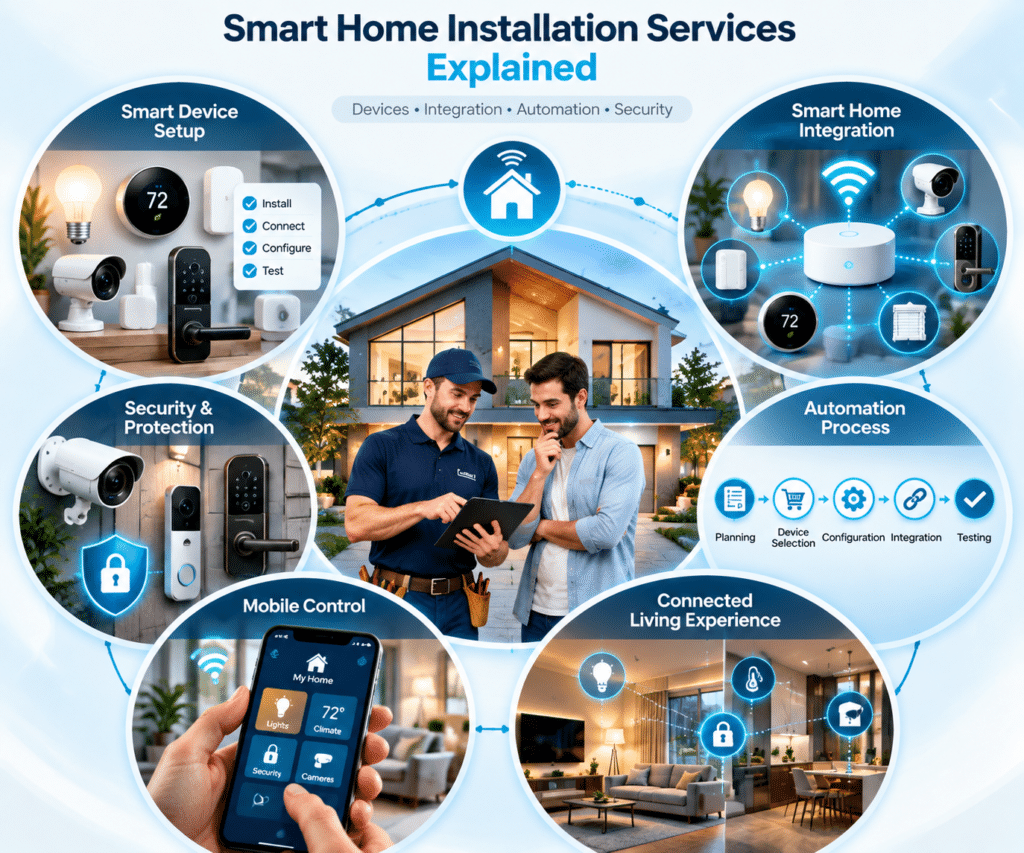
Smart Home Security and Privacy Best Practices
Smart home technology can improve convenience and control, but connected devices also introduce account, privacy, software, and network considerations.
Security therefore extends beyond cameras and smart locks.
Protect Smart Home Accounts and Devices
Many connected products require accounts for setup, remote access, or platform integration.
Strong account management includes using secure passwords, enabling available security features, reviewing who has access, and removing permissions that are no longer needed.
As the number of devices grows, keeping account access organized becomes increasingly important.
Keep Smart Home Software Updated
Smart devices, applications, hubs, platforms, and network equipment may receive software or firmware updates.
These updates can include security fixes, performance improvements, or new functionality.
Homeowners should follow manufacturer guidance and review updates regularly rather than assuming connected devices will remain secure or reliable without ongoing maintenance.
Manage Smart Home Privacy Settings
Different devices handle different types of information.
Cameras may process video, voice assistants may process spoken commands, and sensors may collect information about environmental conditions or activity.
Homeowners should understand what information each device uses, which privacy controls are available, and who can access the system.
Privacy settings should be reviewed periodically, particularly as additional devices are added.
Protect and Manage Your Smart Home Network
The home network connects many smart devices and can influence both reliability and security.
Homeowners should consider router security, Wi-Fi coverage, device management, and where connected products are installed.
A well-managed network supports more reliable communication between devices and reduces avoidable problems as the connected home expands.
Common Smart Home Setup Mistakes
Many smart home problems begin with planning rather than technology failure.
Avoiding a few common mistakes can make a connected system easier to use and expand.
Buying Devices Without Checking Compatibility
A product may work well on its own but still be unsuitable for the wider system.
Before purchasing it, homeowners should confirm supported platforms, required accessories or hubs, network requirements, and compatibility with important existing devices.
Checking these factors early can prevent unnecessary replacements and fragmented controls later.
Adding Too Many Devices Too Quickly
More devices do not automatically create a better smart home.
Adding too many products at once can also mean more applications, accounts, settings, integrations, and troubleshooting requirements.
Starting with a smaller number of useful technologies gives homeowners time to understand the system before increasing its complexity.
Creating Complicated Automation Routines
Automation should reduce friction rather than create it.
A better approach is to begin with simple routines, test them carefully, and add complexity only when there is a clear practical reason.
A straightforward automation that works consistently is more valuable than an elaborate routine that frequently requires correction.
Frequently Asked Questions About Smart Home Installation Services
What are smart home installation services?
Smart home installation services involve planning, connecting, configuring, integrating, and testing compatible smart devices as part of a connected home system.
The exact scope can range from installing individual products to coordinating lighting, climate control, security, sensors, automation, and other technologies.
Can I install smart home devices myself?
Yes. Many basic consumer smart devices are designed for DIY installation.
Smart bulbs, plug-in devices, speakers, and some sensors may be straightforward to configure when the homeowner is comfortable following the manufacturer’s instructions.
More complex projects may require additional technical knowledge or professional support.
What devices can be included in a smart home system?
A smart home system may include lighting, thermostats, cameras, locks, sensors, speakers, displays, entertainment equipment, voice assistants, and other compatible connected devices.
The right combination depends on household goals, existing technology, platform compatibility, and the desired level of automation.
Do all smart home devices work together?
No.
Compatibility depends on platform support, communication technologies, product capabilities, required hubs or controllers, and available integrations.
Homeowners should confirm compatibility for the specific devices and functions they want before purchasing equipment.
Do I need professional smart home installation?
Not every project requires professional installation.
A small DIY setup may be suitable for simple consumer devices, while professional support can become more useful when several systems must be integrated or when the project involves specialist electrical, HVAC, networking, security, or structural work.
How should I start building a smart home?
Begin with one or two clear household goals.
Then select a compatible platform, choose devices that support those goals, check network and installation requirements, test the system, and expand gradually once the first setup is working reliably.
What should I check before hiring a smart home installer?
Look at the scope of the project first.
Homeowners should understand which systems need to be installed or integrated, whether specialist work is involved, how compatibility will be handled, what testing and handover are included, and what support may be available after installation.
Build a Smart Home System That Fits Your Needs
Smart home installation services are most useful when they help turn separate connected products into a system that is easier to control, understand, and maintain.
The foundation remains straightforward: identify useful household goals, select compatible technology, prepare the network, configure devices carefully, test the system, and expand only when additional technology provides a clear benefit.
For smaller projects, homeowners may be able to manage much of the setup themselves. As the number of devices and integrations grows, professional smart home installation may become more useful for coordinating technology and ensuring that the system works as intended.
A successful smart home is not defined by how many devices it contains. It is defined by whether the technology works together reliably and supports the way the people in the home actually live.