

Smart home automation allows connected devices to respond automatically to schedules, sensor activity, conditions, and user preferences. The important distinction is that a smart device is not necessarily an automated device. A smart light controlled from an app is connected technology; when that light turns on because motion is detected after sunset, it becomes part of an automation routine.
For homeowners who are new to the subject, the most useful starting point is not buying as many devices as possible. It is understanding what you want the home to do, choosing compatible technology, and creating a small number of routines that solve real everyday problems.
A smart home automation system can bring together devices, sensors, controllers or platforms, connectivity, and programmed rules. These components work together so that an event can trigger a response without requiring the homeowner to manually control every device each time.
This guide explains how that process works, which components are involved, how to begin automating a home, which technologies support communication between devices, what affects cost, and when professional installation may be useful.
What Is Smart Home Automation?
Smart home automation is the use of connected technology and programmed rules to make selected home functions respond automatically.
The difference between simple smart-device control and automation becomes clearer with an example. If you open an app and turn on a smart light yourself, you are remotely controlling a connected device. If a motion sensor detects someone entering a hallway after sunset and the system turns the light on automatically, the home is using an automation rule.
That rule can be understood as:
Trigger → Condition → Action
The trigger is the event that starts the routine. The condition determines whether the routine should continue, and the action is what the connected device actually does.
In a hallway-lighting example, motion detection may be the trigger, “after sunset” may be the condition, and turning on the light may be the action.
This distinction matters because simply owning several connected products does not automatically create a useful home automation system. The value comes from deciding how those products should interact and when an automatic response is actually helpful.
Automation can support tasks such as lighting control, temperature management, security notifications, access routines, and other repeated household activities. The appropriate setup depends on the homeowner’s goals, the capabilities of the devices, and whether those devices can communicate within the chosen system.
How Does Smart Home Automation Work?
Smart home automation works by connecting an event with a programmed response. The system first detects something, evaluates the relevant rule, and then instructs a device or system to act.
Trigger
A trigger is the event that starts an automation routine.
That event might be motion detected by a sensor, a door opening, a scheduled time, a temperature change, or a supported location-based event. The trigger tells the automation system that a rule should be evaluated.
For example, a hallway motion sensor may detect movement. That does not necessarily mean the light should turn on immediately. The system may first need to check another rule.
Condition
A condition determines whether the action should happen.
Suppose the homeowner wants hallway lighting to respond to movement only at night. Motion remains the trigger, but “after sunset” becomes the condition. If movement occurs during daylight, the condition is not satisfied and the lighting routine does not need to run.
Conditions make automation more useful because they allow the same trigger to produce different outcomes depending on context.
A condition could relate to time, occupancy, temperature, device status, or another supported factor. What can be used depends on the devices and platform involved.
Action
The action is the result produced after the trigger occurs and any required conditions are satisfied.
In the hallway example, the action is turning on the light. In another routine, the action might be adjusting a thermostat, sending a notification, locking a supported smart lock, or changing the state of another connected device.
The basic relationship remains the same:
Motion detected → It is after sunset → Hallway light turns on
That simple structure is the foundation of many home automation routines.
Why Automation Rules Matter
Automation rules are what turn a group of connected devices into a coordinated system.
A smart thermostat can be adjusted manually from an app, but automation can allow temperature settings to change according to a schedule or another supported condition. A smart lock can be controlled remotely, but a broader routine may combine access-related events with notifications or other actions where the devices and platform support that behavior.
The point is not to automate everything. A useful system focuses on routines that reduce repeated tasks or make selected home functions easier to manage.
What Components Are Needed for Smart Home Automation?
A smart home automation system is usually built from several connected elements rather than one product. Your current content identifies five core components: smart devices, sensors, controllers or automation platforms, connectivity infrastructure, and automation rules.
Smart Devices
Smart devices perform the physical actions within the system.
Examples include smart lights, locks, thermostats, cameras, plugs, and compatible connected appliances. Each device has its own function, but that device becomes part of automation only when it can respond to a rule, sensor, schedule, or another supported event.
A smart light, for example, provides the lighting function. The automation system determines when that light should respond.
Sensors
Sensors provide information about what is happening in or around the home.
A motion sensor can detect movement, a door sensor can report whether an entry point has opened, and temperature or light sensors can provide environmental information.
The sensor does not necessarily perform the final action. Instead, it supplies information that another part of the system can use when evaluating an automation rule.
Controllers and Automation Platforms
Controllers and automation platforms coordinate supported devices and routines.
Depending on the system, this role may be handled by an app, hub, voice-assistant ecosystem, automation platform, or another controller. The purpose is to connect the event being detected with the rule that should be evaluated and the device that should respond.
A simple sequence might look like this:
Sensor detects movement → automation rule is evaluated → connected light responds
The exact path depends on the products and system architecture being used.
Connectivity Infrastructure
Devices need a reliable way to communicate.
Smart home products may use technologies such as Wi-Fi, Zigbee, or Z-Wave, depending on the product and ecosystem. Matter may also affect interoperability between supported products.
Compatibility should be checked at the product and platform level.
Automation Rules
Automation rules define what the system should do when a particular event occurs.
For example:
If motion is detected after sunset, turn on the hallway lights.
Here, motion detection is the trigger, after sunset is the condition, and turning on the lights is the action.
The complexity of these rules can vary significantly. A beginner may start with one straightforward routine, while a more developed system may coordinate multiple devices. In either case, the strongest approach is to build automation around a real household need rather than complexity for its own sake.
How to Automate Your Smart Home Step by Step
Creating a smart home automation system does not require automating the entire property at once. A more manageable approach is to identify one useful outcome, select suitable technology, test a simple routine, and expand only after the first setup is working reliably.
Start With the Outcome You Want
Before choosing devices, decide what problem automation should solve.
You might want lighting to respond automatically in a hallway at night, receive a notification when a particular door opens, reduce repeated thermostat adjustments, or create a morning or evening routine.
A goal such as “make my house smart” is too broad to guide good decisions. A goal such as “turn the hallway lights on automatically after sunset when motion is detected” is specific enough to identify the devices and rule required.
That difference makes planning much easier.
Choose Devices That Support the Goal
Once the outcome is clear, choose technology that can actually support it.
A nighttime-lighting routine may require compatible lighting and a motion sensor. A home-access notification may require a supported door sensor or smart access device. The right combination depends on the automation you are trying to create.
This is also where compatibility becomes important. A device may be useful on its own but still be a poor choice if it cannot work with the platform, sensors, or other products needed for the routine.
Create One Simple Routine First
Beginners usually benefit from starting with one straightforward automation rather than building several complex routines immediately.
A morning routine might respond to a scheduled time. Sunset lighting might activate selected lights at a particular time or supported environmental condition. A security-related routine might send a notification when a sensor detects activity.
The purpose of the first routine is not to demonstrate everything the technology can do. It is to create something useful, understandable, and easy to test.
Test Before Expanding
Once the automation is configured, test it under the conditions in which it is supposed to operate.
Check whether the trigger is detected correctly, whether the condition behaves as expected, and whether the action occurs consistently. If the routine produces unwanted results, adjust it before adding more devices or additional rules.
After the first routines are working well, the system can gradually expand into other areas such as lighting, climate control, security, access, or entertainment.
For readers who are still planning the broader connected-home foundation—including device selection and setup—the how to set up a smart home guide provides additional planning context.

Practical Smart Home Automation Ideas for Everyday Life
Smart home automation is most useful when it solves a specific household problem rather than simply adding more connected products. A good routine should be easy to understand, predictable in normal use, and simple enough to adjust when a homeowner’s needs change.
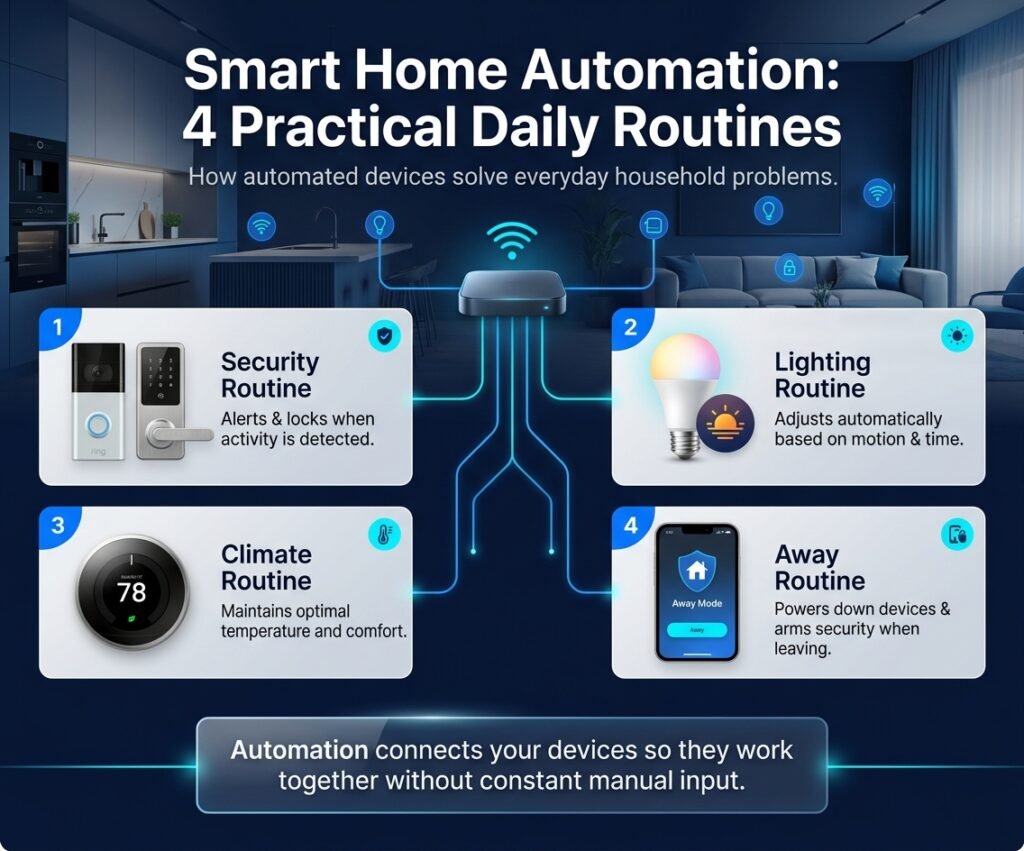
Lighting is one of the clearest examples. A homeowner may want hallway lights to turn on automatically when movement is detected after sunset, or selected exterior lights to follow an evening schedule. In this case, the automation is not valuable because the lights are “smart”; it is valuable because the home automation system removes a repetitive manual task and responds to a defined condition.
Automated Lighting
Smart lighting routines can respond to schedules, motion, or other supported conditions. A simple setup may involve a motion sensor and compatible lighting. When the sensor detects movement and the programmed condition is met, the lights respond automatically.
This is a useful example of how smart home devices become more valuable when they are connected through a clear automation rule. The benefit comes from the relationship between the sensor, the condition, and the lighting response rather than from the individual device alone.
Security Automation
Security-related automation can help homeowners receive information about specific events without continuously checking each device manually.
For example, a door or window sensor may detect activity and trigger a notification. A motion event may also be used within an away routine if the devices and platform support that behavior.
The important limitation is that automation should support awareness rather than create unnecessary alerts. Too many notifications can make a system harder to manage, so security routines should be designed around events the homeowner actually wants to know about.
Temperature Management
Connected climate devices can also be included in smart home automation. A thermostat may follow a schedule, respond to supported conditions, or allow the homeowner to change settings remotely.
The exact behavior depends on the device, the heating or cooling system, and the platform being used. For that reason, climate automation should be planned around compatibility and actual household routines rather than assuming every thermostat or HVAC system supports the same features.
Daily Routine Automation
Some homeowners use automation to coordinate repeated daily activities.
A morning routine might activate selected devices at a scheduled time. An evening routine may adjust lighting or other supported settings. An away routine may change the state of several compatible devices after the system detects that the home is unoccupied.
These examples show how smart home automation systems can move beyond one-device control. The system becomes more useful when several connected actions support a real routine in a way that remains understandable and manageable.
Smart Home Automation Technologies and Connectivity
Smart home automation depends on reliable communication between devices, sensors, controllers, and automation platforms. Different forms of home automation technology can support that communication, but they do not all perform the same role.
Wi-Fi is commonly used by many connected devices because it allows products to communicate through the home network. It can be suitable for cameras, speakers, displays, and other devices that rely on direct network connectivity, but performance still depends on coverage, router capacity, and the requirements of the products being used.
Zigbee is a low-power wireless technology used by many connected-home products. It is often used in systems where compatible devices communicate through a supported hub or controller.
Z-Wave is another wireless technology used in residential automation and connected-home systems. Like Zigbee, it depends on compatible products and supported controllers.
Matter is different from those radio technologies. Matter is an interoperability standard intended to help compatible products work across supported smart-home ecosystems. Matter support does not automatically make every device compatible with every feature, so homeowners should still check the capabilities of the specific products and platforms they plan to use.
The practical lesson is that smart home technology should be selected as a system, not as a collection of isolated specifications. A device may be technically advanced and still be a poor choice if it does not communicate properly with the rest of the setup.
Factors That Affect Smart Home Automation Cost
There is no single price that applies to every smart home automation project. Cost varies because the scope can range from one or two simple routines to a larger whole-home system involving several technologies and areas of the property. Pasted markdown
The number of devices is one factor, but it is not the only one. A small installation with a few compatible products may be relatively straightforward, while a system that combines lighting, security, climate control, and entertainment may require more equipment, configuration, testing, and integration.
System complexity also matters. Two homes with the same number of devices can require very different levels of work if one uses simple standalone routines and the other needs several products to coordinate through a shared platform.
Existing infrastructure can influence the project as well. Network coverage, existing smart devices, the layout of the home, and current technology systems may affect how easily new products can be added.
Integration requirements can also increase planning needs. When several systems must communicate reliably, homeowners may need more time to evaluate compatibility, test routines, or involve professional support.
For these reasons, it is more useful to think about smart home automation cost in terms of scope and complexity than to expect one standard figure that applies to every home.
When Professional Smart Home Installation May Be Useful
Many homeowners can begin with simple automation using consumer smart devices and basic routines. Professional help becomes more relevant when the project grows beyond straightforward setup or when several systems need to work together reliably. Pasted markdown
A larger project may involve lighting, security, climate control, access devices, entertainment systems, network planning, or several automation platforms. In that situation, the challenge is often not installing a single device; it is making sure the overall system is compatible, understandable, and manageable after the work is complete.
For projects involving complex integration or installation requirements, professional smart home installation may be useful when additional planning, technical coordination, or specialist work is needed.
Professional support should remain proportional to the project. A homeowner does not necessarily need an installer for every smart bulb or plug-in device. The decision should depend on the complexity of the work, the systems involved, and whether the homeowner can confidently configure, test, and maintain the setup.
Frequently Asked Questions About Smart Home Automation
What is smart home automation?
Smart home automation is the use of connected devices, sensors, controllers or platforms, and programmed rules to make selected home functions respond automatically to events, schedules, conditions, or user preferences.
For example, a homeowner may configure a hallway light to turn on when motion is detected after sunset. The motion event acts as the trigger, the time requirement acts as the condition, and the light turning on is the action.
How do I automate my home?
Start by identifying one specific task you want to automate. Then choose compatible devices that can support that task, create a simple routine, test how it behaves, and expand only after the first automation is working reliably.
A focused goal such as automatically turning on an entry light after dark is easier to plan than trying to automate an entire home immediately.
What devices are needed for smart home automation?
There is no single set of devices required for every smart home automation system. The equipment depends on what you want to automate.
A typical setup may involve a device that performs the action, a sensor or another source that provides the trigger, an automation platform or controller, and compatible connectivity. Some devices combine several of these functions, while other systems use separate components.
The important question is whether the products support the automation you want to create and can work together within the chosen system.
What is the difference between a smart device and home automation?
A smart device is a connected product that can provide digital or remote controls. Home automation describes what happens when connected technology performs an action automatically according to a rule.
For example, turning a smart light on from an app is smart-device control. Having that same light turn on automatically when motion is detected under a defined condition is home automation.
This distinction is important because owning several smart products does not necessarily mean the home has a coordinated automation system.
Can I automate my home myself?
Many basic smart home automation routines can be configured by homeowners using consumer devices and the setup tools supplied with compatible platforms.
DIY setup may be practical for straightforward products such as plug-in devices, supported sensors, smart lighting, or basic routines. More complex projects may require additional knowledge when several technologies need to be integrated or when installation involves electrical, HVAC, structural, security, or other specialist work.
The right approach depends on the actual task rather than whether the product is described as “smart.”
What should I automate first?
A good first automation is usually a small routine that solves a repeated problem and is easy to test.
For one household, that might be hallway lighting after dark. For another, it may be a door notification, a scheduled temperature adjustment, or a simple morning routine.
Starting with an automation that has a clear purpose makes it easier to understand the system before adding more devices or more complicated rules.
Do all smart home devices work together?
No. Smart home devices may use different platforms, communication technologies, ecosystems, and feature sets.
Two products may both be described as smart devices without supporting direct integration with each other. Compatibility therefore needs to be checked for the specific devices, platforms, and functions involved.
Standards such as Matter are intended to improve interoperability among supported products, but homeowners should still confirm product-specific compatibility rather than assuming every feature will work across every system.
Does smart home automation require a hub?
Not always.
Some devices communicate directly through Wi-Fi or another supported connection, while other products may rely on a hub, bridge, controller, or platform to coordinate communication and automation.
Whether a hub is needed depends on the devices, connectivity technologies, ecosystem, and automation functions being used. A small setup may operate without a dedicated hub, while another smart home automation system may depend on one for device communication or centralized control.
Is smart home automation expensive?
The cost can vary significantly because automation projects differ in scope.
A simple setup using a small number of compatible devices may require relatively little equipment, while a larger residential automation project involving lighting, climate control, security, access, entertainment, or professional integration can involve substantially more hardware and planning.
Instead of looking for one universal price, homeowners should consider the number of devices, system complexity, existing infrastructure, compatibility requirements, and whether professional installation or specialist work is needed.
Can smart home automation be expanded later?
In many cases, yes, provided the existing system and new products are compatible.
Planning with future expansion in mind can make it easier to add devices or new automation routines later. However, expansion should still be based on useful household needs rather than simply increasing the number of connected products.
A well-planned system can grow gradually while remaining understandable and manageable.
Conclusion: Creating a Smarter Home Through Automation
Smart home automation works best when technology is built around real household needs rather than added simply because a device is available. The basic idea remains straightforward: a system detects an event, checks any relevant conditions, and then performs an action through a compatible connected device.
Trigger → Condition → Action
That simple relationship can support anything from automated hallway lighting to temperature adjustments, security notifications, or coordinated daily routines. As the system grows, the same principle continues to apply, even when several devices or platforms are involved.
For beginners, the strongest approach is usually to start with one clearly defined goal, choose compatible smart home devices, create a simple automation, and test it before expanding. This makes it easier to understand how the system behaves and reduces the chance of building complicated routines that provide little practical value.
Compatibility also deserves attention as the home grows. Different products may rely on different connectivity technologies, platforms, or ecosystems, so a successful home automation system depends on more than simply buying individually capable devices. The products need to support the functions and relationships the homeowner actually wants to create.
Over time, smart home technology can be expanded into lighting, climate control, security awareness, access, entertainment, and other areas where automation provides a clear benefit. The goal should remain the same: create a system that is useful, understandable, and manageable for the people who live in the home.