

A smart home control panel gives homeowners a centralized way to interact with connected devices and manage important smart home functions from one place. Instead of opening separate controls for lighting, climate, security, entertainment, and other systems, a compatible control panel can bring selected functions together through one interface.
The control panel is not the entire smart home system. Its primary role is user interaction. It lets the homeowner view information, change settings, activate routines, and send commands, while the underlying controllers, platforms, networks, and connected devices carry out those instructions.
For example, selecting an evening lighting scene on a panel may send a command through the connected system, which then adjusts compatible lights according to previously configured settings. The panel provides the point of interaction; the rest of the smart home control system handles communication and device response.
For homeowners still planning the broader connected-home foundation, understanding how to set up a smart home can help clarify how devices, platforms, networks, and controls fit together before a dedicated panel is added.
This guide explains what a smart home control panel is, how it works, which features it may provide, how it differs from a hub or mobile app, and when a centralized control interface may be useful.
What Is a Smart Home Control Panel?
A smart home control panel is a centralized interface used to monitor and manage compatible smart home devices and functions.
Depending on the system, a homeowner may use the panel to adjust lights, view security information, change thermostat settings, activate automation scenes, or access entertainment controls. Rather than replacing the connected devices themselves, the panel provides a common place from which the homeowner can interact with them.
This distinction is important because terms such as smart home control panel, smart hub, smart home controller, and mobile app are sometimes used as though they describe the same thing. They can overlap in certain products, but their primary roles are different.
A home control panel is mainly the user-facing interface. A smart hub or controller is more closely associated with communication and coordination between supported devices. A mobile app provides another user interface, often with the added advantage of remote access from a phone or tablet.
Some products may combine more than one of these roles, so homeowners should evaluate the actual capabilities of the system rather than relying only on the product name.
ce may display device status, rooms, scenes, available controls, notifications, or other information supported by the system.
A dedicated interface can also be useful in households where several people need access to common smart home functions. Instead of relying entirely on one person’s smartphone, household members can use a shared control point for supported features.
The usefulness of the interface depends on how clearly the system has been organized. A sophisticated control panel can still become difficult to use if rooms, devices, scenes, and controls are poorly configured.
Automation Scene Control
A smart home control panel can also provide convenient access to automation scenes and routines.
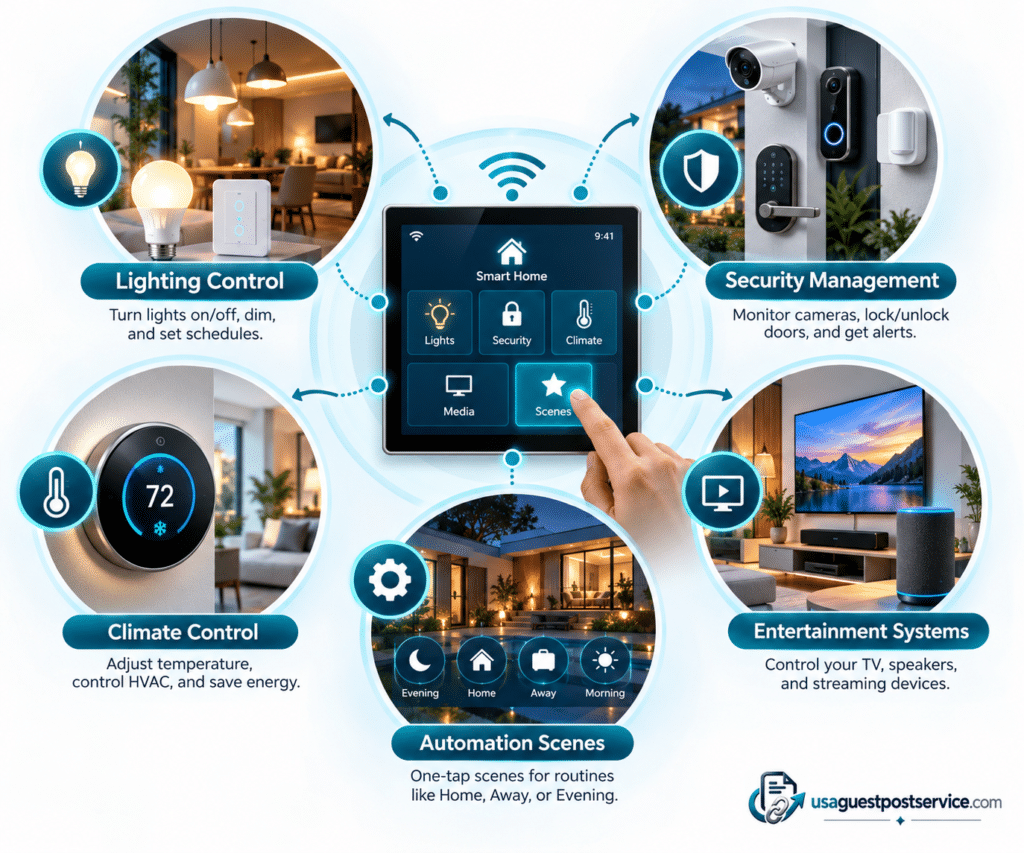
For example, an “Evening” scene might adjust selected lights and other compatible settings through one command. The homeowner activates the scene from the control panel, while the underlying home automation system carries out the programmed actions.
The control panel does not create automation by itself. It provides a user-friendly way to interact with automation that has already been configured within the connected system.
For a deeper explanation of how triggers, conditions, devices, and automated actions work together, our smart home automation guide explains how connected devices and automation routines create responsive home environments.

What Can You Control With a Smart Home Control Panel?
A smart home control panel can provide access to several connected-home functions, but the exact capabilities depend on the platform, controller, integrations, and devices installed in the home.
Some systems may control only a few functions, while a more integrated smart home control system may bring lighting, climate, security, entertainment, and automation into one interface.
Lighting Control
Lighting is one of the most common functions managed through a smart home control panel.
A homeowner may use the interface to turn compatible lights on or off, adjust brightness, select lighting scenes, or access other supported settings.
For example, an evening scene could adjust several connected lights through a single command instead of requiring each light to be controlled individually.
Lighting can also work with smart home automation. In that case, sensors, schedules, or other supported conditions may cause lights to respond automatically without requiring the homeowner to use the control panel each time.
Security Management
A compatible control panel may provide centralized access to selected security-related functions.
Depending on the connected system, homeowners may be able to view camera feeds, check door or window sensor status, review notifications, or interact with supported smart locks and access controls.
The control panel itself is not the security system. Cameras, sensors, locks, and other security devices continue to perform their individual functions. The panel simply provides an organized interface for accessing supported information and controls.
Climate Control
Climate systems can also be integrated into a smart home control panel.
A homeowner may be able to view temperature information, adjust a compatible thermostat, or activate climate-related scenes and routines from the same interface used for other home functions.
The panel sends the request through the connected system, while the thermostat or climate equipment performs the actual adjustment.
This can make temperature management more convenient when climate control is already part of a broader connected-home environment.
Entertainment Systems
Some smart home control systems can also integrate supported entertainment equipment.
Depending on the installation, homeowners may be able to access audio, video, media, or selected entertainment settings through the same centralized interface used for other smart home functions.
The available controls vary significantly between systems, so compatibility should be confirmed before assuming that a particular television, speaker, receiver, or media device will work with a specific control panel.
Smart Home Control Panel vs Smart Hub vs Mobile App
A control panel, hub, and mobile app can all be involved in managing a connected home, but they should not automatically be treated as interchangeable.
| Component | Primary Role | Typical Function |
| Smart home control panel | In-home user interface | View status, change settings, activate scenes, access supported systems |
| Smart hub or controller | Communication and coordination | Connect or coordinate compatible devices and automation functions |
| Mobile app | Portable user interface | Control supported devices, receive notifications, and access the system remotely |
A smart home control panel is primarily about interaction. A hub or smart home controller is generally more focused on coordinating supported technologies. A mobile app provides another interface, often designed around personal and remote access.
These roles may overlap. A wall-mounted panel can sometimes contain controller functions, and some systems may not need a separate hub at all. The important point is to understand what each product actually does rather than assume that every device carrying one of these labels performs the same job.
How Smart Home Control Panels Work With Home Automation Systems
A smart home control panel and a smart home automation system are closely related, but they perform different jobs.
Automation allows connected devices to respond according to programmed triggers, conditions, schedules, or commands. The control panel gives homeowners a convenient interface for viewing or changing those settings and, where supported, manually activating scenes.
Consider a hallway-lighting routine that turns the lights on after motion is detected at night. The automation system handles the trigger, evaluates the condition, and performs the action. The control panel may allow the homeowner to view the status of those lights, disable the routine, adjust a setting, or activate a related scene manually.
The panel therefore does not replace automation. It provides a human-facing control layer for interacting with a larger smart home automation environment.
This relationship becomes particularly useful as the home grows. A few connected products may be easy to manage through individual applications, while a larger system can become easier to understand when important functions are organized through a consistent smart home control center.
Do You Need a Smart Home Control Panel?
Not every connected home needs a dedicated control panel.
For a small setup with a few lights, one thermostat, or a limited number of devices, mobile apps or existing controls may be sufficient. Adding another interface could create unnecessary complexity rather than simplify the system.
A control panel becomes more compelling when several household systems need to be managed regularly or when multiple people need convenient access to the same controls.
When a Control Panel May Be Useful
A centralized panel may make sense when lighting, security, climate, entertainment, and other technologies are already integrated into one broader smart home control system.
It can also be helpful in larger homes where important controls need to remain available in a consistent physical location. Shared household access is another consideration. A wall-mounted panel can provide common controls without requiring every person to use one homeowner’s phone or install and manage several separate applications.
The value tends to increase when the interface genuinely simplifies the system rather than simply duplicating controls that are already easy to use.
When a Control Panel May Not Be Necessary
A dedicated panel may add little value when the smart home contains only a small number of devices or when existing applications already provide a simple and reliable experience.
The decision should therefore depend on system complexity, household habits, device compatibility, and preferred control methods rather than on the assumption that every modern smart home requires a control panel.
Smart Home Control Panel Installation Considerations
Installing a smart home control panel involves more than mounting a screen. The panel needs to fit into the existing connected-home environment and support the functions the homeowner expects to manage.
Device and System Compatibility
Compatibility should be considered before choosing a control panel.
The homeowner needs to determine whether the proposed interface can work with the existing platform, controller, smart home devices, and important household systems.
A panel may have an attractive interface but still offer limited value if it cannot access the technologies already installed in the home.
Network and Communication Requirements
Connected-home systems rely on communication between devices, controllers, services, and interfaces.
Network conditions can therefore affect the overall experience, particularly as more connected products are added. The specific requirements depend on the system, so homeowners should follow the requirements of the products and platform being installed.
Existing Automation and Platforms
A new control panel should complement existing automation rather than create a second, disconnected control environment.
Before installation, review the current routines, platforms, device accounts, and controllers. Understanding what already exists makes it easier to determine whether a new smart home control panel can be integrated effectively or whether changes to the wider system are required.
Future Expansion
Future plans can also influence the decision.
A homeowner may start with lighting and climate control but later add security, access, entertainment, or other technologies. Choosing a control approach that can accommodate realistic future needs may help avoid replacing the interface prematurely.
For a broader look at device planning, compatibility, system setup, and implementation, the smart home installation setup guide provides additional planning context for homeowners building or expanding a connected home.
If the project involves several integrated systems or installation work that is difficult to coordinate independently, homeowners can also review what to consider when searching for smart home installation near me before choosing professional help.
Frequently Asked Questions About Smart Home Control Panels
What is a smart home control panel?
A smart home control panel is a centralized interface that allows homeowners to interact with compatible connected devices and smart home functions from one location.
It may provide access to lighting, climate settings, security information, entertainment controls, scenes, and other supported functions depending on the system.
What devices can a smart home control panel manage?
The devices a panel can manage depend on the smart home platform, controller, integrations, and products being used.
A compatible system may provide access to lighting, thermostats, smart locks, sensors, cameras, entertainment equipment, and other connected technologies, but homeowners should verify specific compatibility rather than assume that every smart device will work with every panel.
Is a smart home control panel the same as a smart hub?
No. Their primary roles are different.
A smart home control panel is mainly a user interface. A smart hub is generally more focused on helping compatible devices communicate or coordinate with one another.
Some products can combine both roles, so the actual capabilities of the product matter more than the label alone.
Is a smart home control panel the same as a mobile app?
Not necessarily.
Both can provide access to smart home functions, but a mobile app is designed for smartphones or tablets and may provide remote access while the user is away from home.
A dedicated control panel usually provides a fixed in-home interface that multiple household members may be able to access.
Do all smart homes need a control panel?
No.
A small smart home may work well with device applications, voice controls, existing switches, or other interfaces. A dedicated control panel tends to become more useful when the system contains several connected technologies or when household members benefit from a shared centralized interface.
Can a smart home control panel work with automation systems?
Yes, when the systems are compatible.
The control panel can provide access to automation scenes, settings, or system status, while the automation platform handles programmed responses such as triggers, conditions, schedules, and actions.
Can a smart home control panel replace a smart hub?
Not automatically.
A control panel and a hub perform different primary functions. Whether one product can perform both roles depends on its design and supported capabilities.
Homeowners should check what the specific panel controls, which communication technologies it supports, and whether an additional hub or controller is required.
Can an existing smart home add a control panel later?
Potentially, provided the new panel is compatible with the existing smart home system and the functions the homeowner wants to manage.
Existing platforms, devices, network requirements, automation routines, and future expansion plans should be reviewed before adding a new control interface.
Conclusion: Creating a More Manageable Connected Home
A smart home control panel can provide a clearer and more centralized way to interact with connected technology, but it should be viewed as part of a larger system rather than as the system itself.
Its main value is bringing useful controls into one interface. The underlying controllers, platforms, network connections, automation rules, and connected devices still determine what the home can actually do.
For a smaller setup, a dedicated panel may not be necessary. As the number of connected systems grows, however, a well-designed control interface can make lighting, climate, security, entertainment, and automation easier for household members to access and understand.
The best choice is therefore not necessarily the control panel with the most features. It is the one that works with the home’s existing technology, supports the functions people actually use, and fits naturally into the wider connected home technology environment.