
Smart home types can be understood by how much automation a home uses, how connected devices communicate, and how household systems are controlled. Some homes use a few app-controlled lights or smart plugs, while others integrate lighting, security, climate control, entertainment, and energy monitoring into one coordinated system. The right setup depends on household needs, device compatibility, budget, privacy requirements, and the amount of automation that provides practical value.
Understanding the different types of smart homes helps homeowners choose suitable technology without purchasing unnecessary equipment. It also makes it easier to compare smart home systems, identify the essential elements of a smart home, and decide whether a basic connected setup, a hub-based arrangement, or a fully integrated home automation system makes the most sense.
What Are Smart Home Types?
Smart home types describe the different ways connected household technology can be organized and used. A home may be classified according to its automation level, control system, connectivity method, or the household functions it supports.
For example, a basic smart home might contain a few smart bulbs controlled through a mobile application. A more advanced setup could use sensors and automation rules to coordinate lighting and climate controls. A fully integrated system may connect several compatible technologies through centralized controls.
There is no single universal classification that defines every smart home. These categories are practical ways to understand the available options, and they often overlap. A home can use a hub-based system, support voice control, and automate lighting and security at the same time.
The important distinction is between simply owning connected devices and having a system in which compatible products work together to support everyday activities.
What Are the Different Types of Smart Homes?
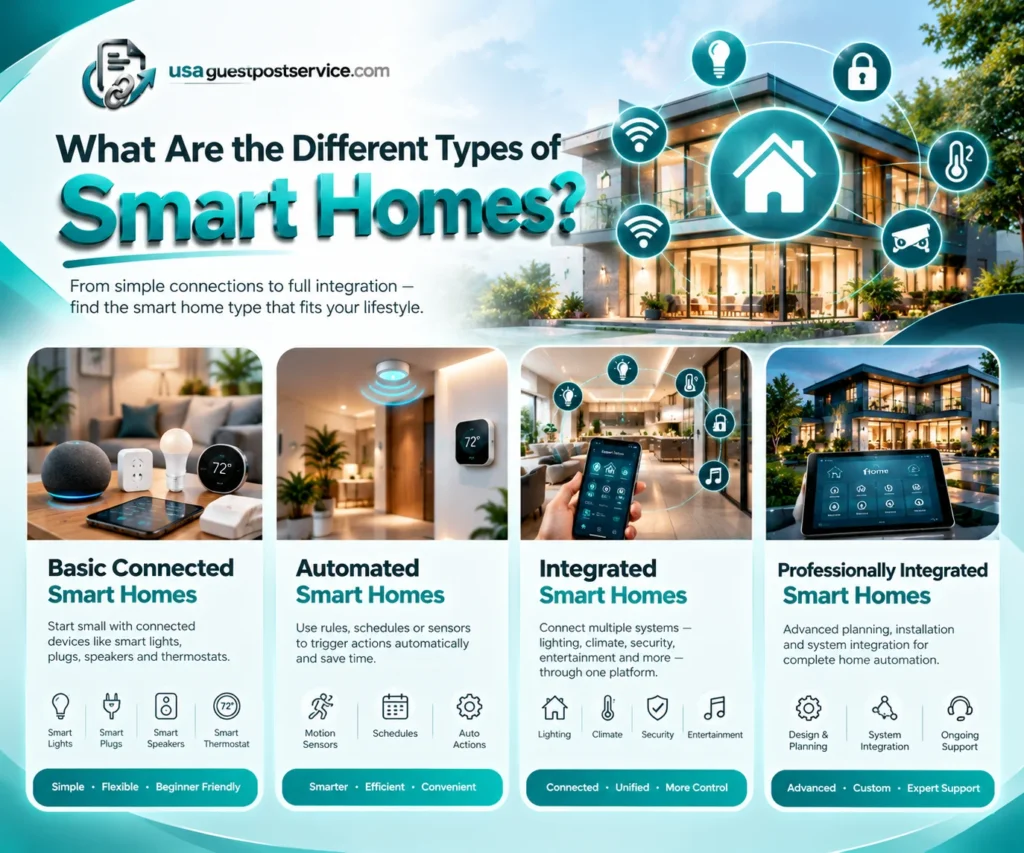
The types of smart homes can first be understood through their level of connectivity and automation. This approach helps homeowners determine how much technology they need and whether a more advanced system would offer meaningful benefits.
Basic Connected Smart Homes
A basic connected smart home uses a small number of internet-connected or digitally controlled products. These may include smart light bulbs, connected plugs, a smart speaker, or a compatible thermostat.
Most devices are managed individually through their applications or supported control interfaces. Some may also offer voice control, scheduling, or simple automation.
For instance, a homeowner could schedule a smart light to turn on in the evening or control a compatible plug through a mobile application. These functions provide convenience without requiring a comprehensive home automation system.
Basic connected homes are suitable for beginners who want to explore smart home technology gradually. Starting small also makes compatibility, setup, and troubleshooting easier to understand.
Automated Smart Homes
An automated smart home uses rules, schedules, sensors, or supported events to trigger actions without requiring a separate manual command each time.
For example, a compatible motion sensor could activate a hallway light after dark. A scheduled routine might adjust supported lighting and thermostat settings when household members normally go to bed.
The difference between a connected home and an automated home is the use of predefined relationships between devices and events. Individual devices may still work independently, but automation allows them to respond to selected conditions.
These systems are useful when repeated household tasks can be simplified through reliable routines. However, automation must be configured correctly, and the available triggers depend on the specific devices and control platform.
Integrated Smart Homes
An integrated smart home connects multiple household systems through compatible controllers, applications, or shared automation platforms.
A setup may combine lighting, climate control, security, entertainment, sensors, and other connected technologies. Instead of managing every function separately, users can access supported controls through a shared interface.
For example, a compatible routine could turn off selected lights, adjust the thermostat, and activate designated security functions when the household leaves home.
Integration can improve convenience, but compatibility is essential. Products that connect to the same broad ecosystem may still offer different features, and some integrations require additional hardware or configuration.
An integrated smart home should be planned around the functions the household actually needs rather than the number of devices that can be connected.
Professionally Integrated Smart Homes
A professionally integrated smart home typically involves more extensive planning, equipment configuration, networking, and coordination across household systems.
These projects may include whole-home lighting control, security equipment, climate management, entertainment systems, dedicated control interfaces, and more complex automation.
Professional planning can be useful when several technologies must work together, when a property has specialized requirements, or when installation involves electrical, HVAC, networking, or other technical work.
However, professional installation is not a separate technology standard. A professionally installed home may use many of the same protocols and devices found in a DIY setup. The difference lies primarily in project scope, design, installation, and integration support.
Types of Smart Home Systems by Control Method
Another way to compare smart home types is by looking at how devices are managed. Some systems rely on individual applications, while others use a central hub, cloud services, local controllers, or a combination of approaches.
App-Controlled Smart Home Systems
App-controlled systems allow users to manage compatible devices through a smartphone or tablet. Depending on the products, an application may provide remote controls, device status, scheduling, notifications, and automation settings.
This approach can work well for households with a relatively small number of connected products. It may also be sufficient when each device serves a distinct purpose.
The main limitation is that different brands can require separate applications or accounts. As a system grows, managing many individual interfaces may become inconvenient.
App control is therefore a useful starting point, but homeowners should consider whether their preferred platform can support future integration.
Voice-Controlled Smart Home Systems
Voice-controlled systems let users interact with compatible devices through a supported voice assistant. Depending on the ecosystem, users may be able to control lights, adjust a thermostat, operate entertainment equipment, or activate predefined routines.
Voice control can be particularly convenient when hands-free operation is useful. However, its capabilities depend on the connected product, the voice assistant, account permissions, and available integrations.
A device that works with one voice platform may not support every function on another. Before choosing a system, verify the supported commands and whether the required hardware is included.
Hub-Based Smart Home Systems
Hub-based systems use a compatible controller or bridge to connect and coordinate supported devices. Depending on the hub, it may support communication technologies such as Zigbee or connect compatible products to a wider automation platform.
A central hub can simplify device management and enable interactions between products that might otherwise operate independently.
However, not every smart home needs a separate hub. Some devices connect directly through a home network or existing platform, while other products require specific controller capabilities.
Homeowners comparing centralized control options can read this guide to choosing a smart home hub, which explains compatibility, connection technologies, and when additional hardware may be necessary.
Cloud-Based Smart Home Systems
Cloud-based systems use internet-connected services to provide certain features, such as remote access, notifications, account management, or device integrations.
These systems can make it easier to control supported devices while away from home. Their exact capabilities depend on the manufacturer and the services used.
A potential limitation is internet or service dependency. Some functions may become unavailable when the connection fails or a cloud service is interrupted.
Before choosing a cloud-dependent setup, check which functions require internet access and whether essential local controls remain available during an outage.
Local-Control and Hybrid Smart Home Systems
Local-control systems can perform certain functions within the home network without sending every command through an external cloud service. A hybrid system may combine local automation with cloud-based remote access or other online features.
Local operation may be useful for households that value responsiveness or want selected functions to continue working during internet outages. However, local control does not automatically guarantee better security or full offline operation.
Capabilities depend on the devices, controller, software, and network design. Confirm which functions are documented to work locally before relying on them.
Many practical smart homes combine local and cloud-based features instead of depending entirely on one approach.
What Are the Main Elements of a Smart Home?
The elements of a smart home are the connected devices, communication methods, control interfaces, automation rules, and security measures that allow the system to operate.
A functional setup generally brings together five core components:
- Smart devices: Connected lights, thermostats, cameras, locks, sensors, appliances, and other products that perform household functions.
- Connectivity and networking: Wi-Fi, Ethernet, Thread, or other supported communication technologies that allow compatible products to exchange information.
- Controllers and interfaces: Mobile applications, voice assistants, hubs, switches, and touchscreens through which users manage devices.
- Automation and software: Schedules, scenes, triggers, and rules that determine how supported devices respond to commands or events.
- Privacy and security controls: Account protection, access permissions, software updates, and appropriate network settings.
These smart home elements do not need to be purchased together. A basic setup might rely on a few connected devices and an application, while a more advanced system may need a central controller and several automation rules.
The key is to select components that work together and serve a clear purpose.
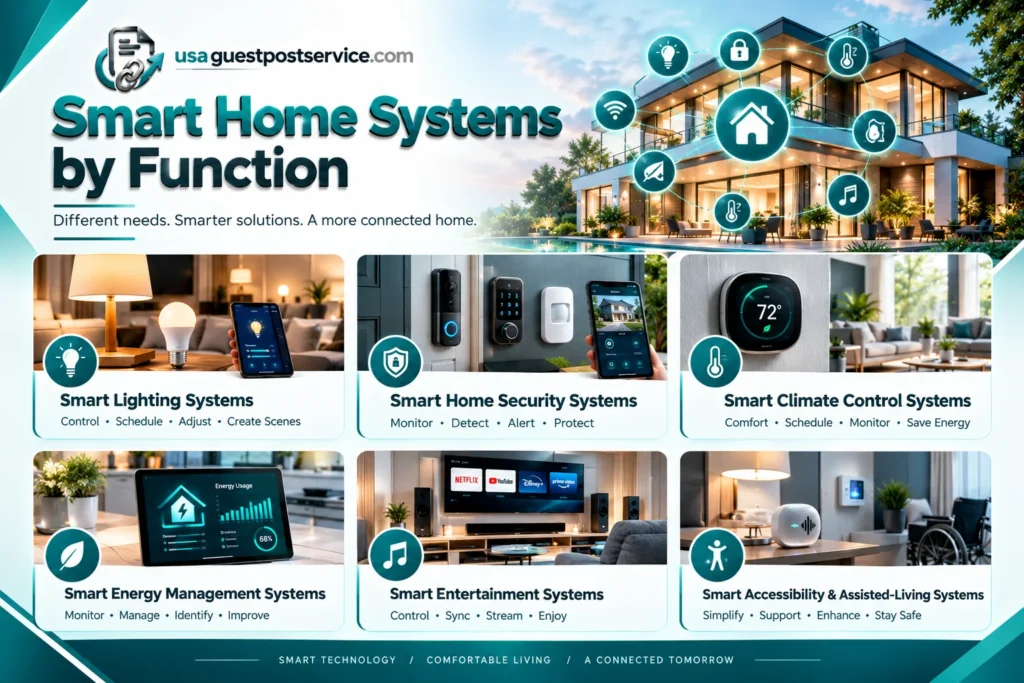
Smart Home Systems by Function
Smart home systems can also be classified according to the household task they support. This functional approach is useful when deciding which parts of the home to connect first.
Smart Lighting Systems
Smart lighting systems provide connected control over compatible bulbs, switches, dimmers, and fixtures. Depending on the products, users may be able to schedule lights, adjust brightness, group fixtures, or activate scenes.
A household might use lighting automation to switch off selected lights at bedtime or activate exterior lighting at a scheduled time.
The most appropriate configuration depends on the existing fixtures, switch arrangements, and desired control features.
Smart Home Security Systems
Smart security systems may include compatible cameras, video doorbells, locks, motion detectors, contact sensors, and monitoring equipment.
These devices can provide information about selected activity around a property and support certain access-management functions. Some systems also offer alerts or integrate security events with other compatible devices.
Connected security equipment should be considered part of a broader security approach. Correct installation, reliable connectivity, privacy settings, and account protection all affect how useful the system will be.
For a closer look at device categories and their practical uses, see the guide to smart home devices and products.
Smart Climate Control Systems
Smart climate systems use compatible thermostats, temperature sensors, humidity sensors, and related equipment to manage or monitor indoor conditions.
Depending on the system, homeowners may be able to adjust supported temperature settings remotely, create schedules, or monitor conditions in different rooms.
The suitability of a thermostat depends on the existing heating and cooling equipment and the product’s installation requirements. Energy savings are not guaranteed because outcomes also depend on insulation, equipment efficiency, settings, climate, and household behavior.
Smart Energy Management Systems
Smart energy management systems help users monitor or manage selected aspects of household electricity use.
Depending on the products, these setups may include energy-monitoring devices, compatible controls, smart thermostats, or supported appliance-management functions.
The objective is to improve visibility into energy use and make it easier to identify practical changes. Monitoring alone does not necessarily reduce consumption; meaningful results depend on how the information is used and which equipment is involved.
Smart Entertainment Systems
Smart entertainment systems connect compatible televisions, speakers, streaming equipment, and other media devices through supported control platforms.
Depending on the setup, users may be able to control selected functions, coordinate multiple speakers, or include entertainment equipment in routines.
A shared control interface can simplify everyday use, but support varies by manufacturer, model, and platform. Check the available integrations before assuming that all equipment can be controlled through one system.
Smart Accessibility and Assisted-Living Systems
Some smart home technologies can support accessibility by reducing the number of physical steps required for everyday tasks.
Compatible voice controls, automated lighting, accessible interfaces, and selected monitoring devices may help people manage household activities more conveniently.
The appropriate setup depends on individual requirements, usability, reliability, and safety needs. Smart devices should not automatically be treated as replacements for specialized assistive equipment or essential safety arrangements.
Types of Smart Home Connectivity
Smart home devices use different communication technologies, and those technologies affect how products connect and interact.
| Technology | General Role | What to Check |
| Wi-Fi | Connects supported devices to a wireless home network | Network compatibility, coverage, and internet requirements |
| Zigbee | Provides wireless communication for compatible connected devices | Hub or bridge requirements and device support |
| Z-Wave | Connects compatible smart home products through a dedicated wireless protocol | Controller compatibility and regional requirements |
| Thread | Provides low-power networking for supported devices | Whether a compatible Thread border router is required |
| Matter | Defines an interoperability standard for supported smart home products | Device certification, controller support, and available features |
| Ethernet | Provides a wired network connection for supported equipment | Network port requirements and installation needs |
These technologies are not interchangeable. Matter is an interoperability standard that can operate over supported network technologies; Thread is a networking technology. A product’s support for one does not automatically establish compatibility with every other standard or control platform.
The Connectivity Standards Alliance explains Matter’s role in enabling supported products to work across compatible smart home ecosystems. Actual functionality still depends on the device, controller, and specific integration.
How to Choose the Right Type of Smart Home
Choosing between different smart home systems starts with identifying the household problems you want to solve. A small connected setup may be enough for basic convenience, while a more integrated system may be appropriate when several functions must work together.
Consider your primary goals, the number of devices you expect to use, your comfort with technology, and the level of automation you actually need. Also account for the cost of additional equipment, possible subscriptions, installation, maintenance, and future expansion.
Compatibility deserves particular attention. Confirm whether your existing devices, preferred control platform, network, and planned additions will work together. If you want a system that can expand over time, choose an approach that supports realistic future requirements without forcing unnecessary purchases.
Privacy and security are equally important. Connected products may involve accounts, microphones, cameras, sensors, or cloud services. Review available permissions, security settings, software support, and the manufacturer’s documentation before adding devices.
If you are new to connected-home technology, the step-by-step smart home setup guide provides further guidance on planning, choosing devices, preparing connectivity, and configuring a practical setup.
Common Smart Home Planning Mistakes
One common mistake is buying devices before deciding what the system needs to accomplish. This can lead to unnecessary purchases or products that do not work well together.
Another is assuming that every device carrying a smart-home label supports the same platforms and functions. Verify compatibility at the level of the exact device and the feature you plan to use.
Homeowners can also underestimate ongoing requirements. Software updates, batteries, account management, connectivity, privacy settings, and subscriptions may all affect the long-term usefulness of the system.
Finally, excessive automation can make a home harder to manage rather than easier. Begin with a few straightforward routines, confirm that they work reliably, and expand only when additional automation provides a clear benefit.
How Do Smart Home Systems Work Together?
Smart home systems work by connecting compatible devices to control interfaces, networking components, and software that manages commands or automation rules.
For example, a sensor may detect movement and communicate the event to a compatible controller. The system may then trigger a light, send an alert, or record the event, depending on the supported configuration.
An integrated system brings multiple functions into a coordinated experience. Rather than treating lighting, security, climate, and entertainment as entirely separate technologies, it allows supported devices to respond to shared commands or selected events.
The exact process varies between system designs. Some use dedicated hubs, others rely on applications or cloud services, and many combine more than one control method.
For homeowners planning a larger connected-home project, smart home installation services explain how device selection, compatibility, network planning, configuration, and system integration fit together.
Frequently Asked Questions About Smart Home Types
What Are the Main Types of Smart Homes?
Smart homes can be described as basic connected homes, automated homes, integrated homes, or professionally integrated systems. These categories describe different levels of connectivity and coordination rather than a single universal classification.
What Are the Main Elements of a Smart Home?
The main elements are connected devices, networking and communication technologies, controllers or user interfaces, automation software, and security controls. The exact components depend on the devices and functions a household needs.
What Is the Difference Between a Smart Home Device and a Smart Home System?
A smart home device performs an individual connected function, such as controlling a light or monitoring a door. A smart home system brings compatible devices, controls, and automation together so they can be managed as a coordinated setup.
Do All Smart Home Systems Need a Hub?
No. Some devices connect directly to a supported network or platform, while others require a hub, bridge, or controller. The need for additional hardware depends on the products, connectivity technologies, and features involved.
Can Different Types of Smart Home Devices Work Together?
Yes, when their platforms, communication methods, and required features are compatible. However, products from different manufacturers do not automatically support every integration. Check the exact device and controller specifications before purchasing.
Which Type of Smart Home Is Best for Beginners?
A basic connected setup is often a practical starting point. Begin with devices that solve a clear household need, confirm that they work together, and add automation gradually as you become familiar with the system.
Choose a Smart Home System That Fits Your Needs
Understanding smart home types makes it easier to compare different levels of automation, control methods, connectivity technologies, and household applications. A basic connected home may provide all the convenience a household needs, while an integrated system can coordinate several compatible functions through shared controls and automation.
Before purchasing equipment, define your priorities, identify the essential smart home elements, and confirm compatibility among devices and platforms. Consider privacy, ongoing costs, network reliability, software support, and future expansion alongside the advertised features.
The best smart home is not necessarily the one with the most connected devices. It is the one whose technology works reliably, meets household needs, and makes everyday activities easier to manage.