
A smart home hub helps compatible devices work together through a central controller, allowing you to manage devices and create automation routines from a supported system. However, not every smart home needs a separate hub. Some devices connect directly to Wi-Fi or an existing smart home platform, while others require a compatible controller, bridge, or additional networking capability.
The right choice depends on the devices you already own, the features you want to use, and the ecosystem you prefer. Before buying a hub, check its compatibility with your exact device models rather than relying on a brand name or a general compatibility label.
This guide explains what a smart home hub does, when you may need one, how major connectivity technologies differ, and what to check before choosing a controller for your home.
What Is a Smart Home Hub and What Does It Do?
A smart home hub is a device or platform that coordinates compatible smart home devices. Depending on its capabilities, it can connect devices, provide centralized control, and support automation routines that make selected devices respond to conditions or commands.
For example, a compatible system might turn on a light when a supported motion sensor detects movement. Whether that routine can run locally, requires an internet connection, or supports particular devices depends on the controller and the products involved.
A hub can be useful when you want several devices to work together rather than managing every product separately. But the term hub does not guarantee support for every communication protocol, device category, or automation feature.
Home Hub Smart Home vs. Smart Speaker, Display, and Bridge
These terms describe related but different functions. Some products combine several functions in one device, so buyers should check the specifications rather than judging by product category alone.
| Device or system | Main role | What to check |
| Smart home hub or controller | Coordinates compatible devices and may manage automation | Supported devices, protocols, and routines |
| Smart speaker | Provides voice interaction and may control supported smart home devices | Whether the exact model includes the controller features you need |
| Smart display | Adds a visual interface for supported controls, information, and sometimes camera feeds | Device integration, display features, and automation support |
| Bridge | Connects a particular device system or protocol to another compatible platform | Which devices and features the bridge exposes |
| Mobile app | Provides an interface for managing supported devices and services | Whether it can control devices directly or requires another controller |
For instance, some Amazon Echo products include built-in smart home capabilities, but those capabilities vary by model. Amazon’s Echo Hub overview describes specific integrated functions rather than establishing that every Echo device works the same way.
The practical lesson is simple: choose by supported capabilities, not by the product label alone.
Matter Controller vs. Thread Border Router
Matter and Thread are closely related in some smart home setups, but they perform different roles.
A Matter controller manages compatible Matter devices after they have been added to a supported smart home system. A Thread border router connects a Thread network to the relevant IP network, allowing compatible Thread devices to communicate with the wider home network.
A Thread-based Matter setup needs the appropriate controller and networking capabilities. Those capabilities may be combined in one product or provided by separate devices.
The distinction matters when purchasing a hub. A device that supports Matter over Wi-Fi does not necessarily provide Thread border-router functionality.
For a concrete example, SmartThings’ Matter integration documentation explains the separate roles of Matter controllers and Thread border routers, including differences between documented hub models. Amazon also publishes a list of Echo and eero devices with built-in Thread border routers.
Always verify the current requirements for the exact model and intended device connection.
Do You Need a Home Hub Smart Home?
You need a separate hub only when your intended devices or features require capabilities that your existing equipment does not provide. If your current devices already meet your control and automation needs, buying another controller may add unnecessary cost and complexity.
The decision depends on your devices, their connection methods, the ecosystem you use, and the functions you want.
When a Hub Is Useful—and When It May Be Unnecessary
Consider two hypothetical households.
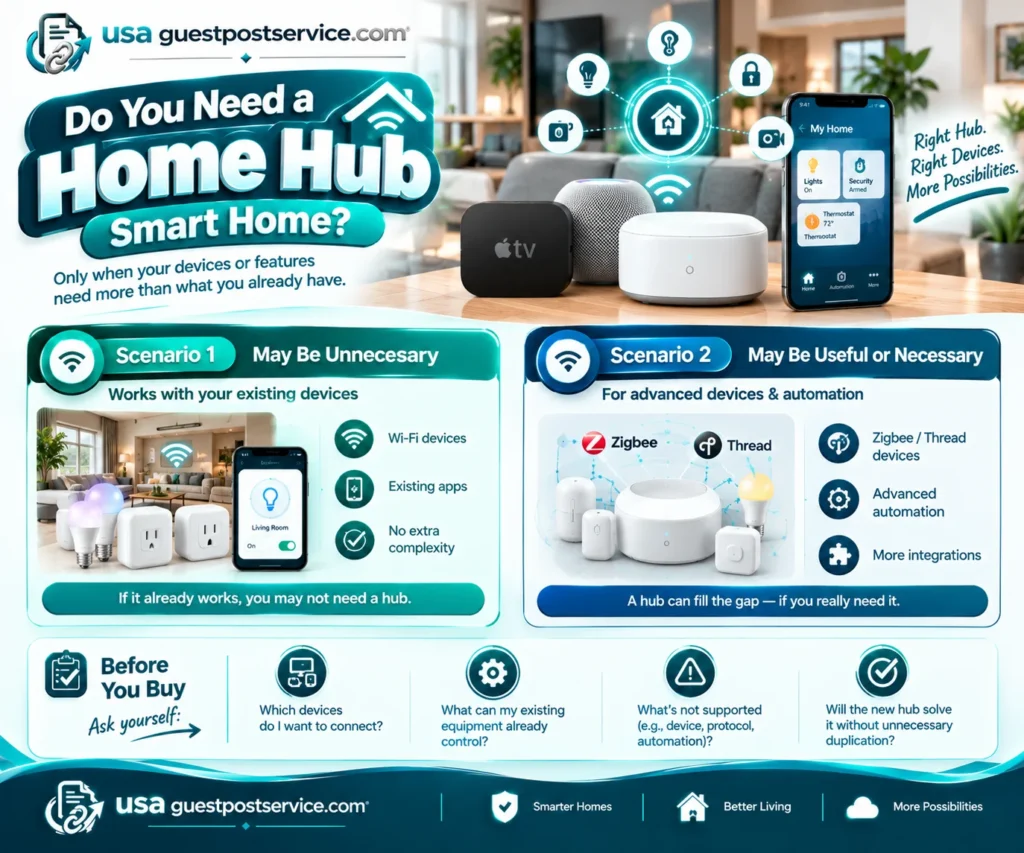
Scenario 1: A separate hub may be unnecessary.
A household uses compatible Wi-Fi smart plugs and lights that can be controlled through their existing apps or smart home platform. In this situation, a Home Hub Smart Home system may not be necessary because the household does not need additional device integrations or more complex automation. If the current setup already provides the required functions, a separate hub may offer little practical benefit.
Scenario 2: Additional controller capabilities may be useful or necessary.
A household plans to add devices that require a supported Zigbee or Thread connection, or wants automation features that its existing equipment cannot provide. A compatible hub or other suitable controller may fill that gap. The household must still verify the exact device requirements and the controller’s capabilities.
Before buying, ask yourself:
- Which devices do I want to connect?
- What can my existing equipment already control?
- Which specific device, protocol, or automation requirement is not currently supported?
- Will the new hub solve that limitation without creating unnecessary duplication?
If you cannot identify a real limitation the new hub will solve, review your existing setup before spending money on additional hardware.
How Smart Home Hubs Work With Different Devices and Ecosystems
A Home Hub Smart Home system can control devices from different manufacturers when the relevant devices, protocols, integrations, and features are supported. Compatibility is not determined by brand alone.
A device may pair successfully with a controller but still lack certain advanced functions. Another device may use a supported protocol yet require an additional bridge or networking component. That is why compatibility should be checked at the level of the exact hub-device combination.
How to Check Home Hub Smart Home Compatibility
Use this process before purchasing a hub or adding a new device.
- List your existing devices. Record their brands, exact model numbers, and the functions you use or plan to use.
- Identify the connection requirements. Check whether each device uses Wi-Fi, Bluetooth, Zigbee, Z-Wave, Thread, or another supported connection method.
- Check the hub’s official compatibility information. Look for the exact device model or the relevant device category and integration.
- Verify any additional hardware requirements. Determine whether the setup needs a Matter controller, Thread border router, bridge, or another component.
- Confirm the features you need. Check whether the hub supports the device’s essential controls, advanced functions, and intended automation routines.
- Review ongoing requirements. Check network conditions, account requirements, subscriptions, firmware support, and any limitations documented by the manufacturer.
Do not rely solely on a product listing that says a device is “smart,” “connected,” or compatible with a particular ecosystem. Those descriptions do not establish that every feature will work with every controller.
For Matter devices, the SmartThings support guide explains the controller and onboarding requirements and describes how supported Matter devices can be shared with other platforms through multi-admin functionality.
Matter, Thread, Zigbee, Z-Wave, Wi-Fi, and Bluetooth
These technologies are not interchangeable alternatives. Some describe how devices communicate, while Matter provides a common interoperability framework for supported smart home devices.
| Technology | Role in a smart home | What the buyer should check |
| Matter | An interoperability standard for supported smart home devices | Controller support, device type, network requirements, and available features |
| Thread | A low-power wireless mesh networking technology | Whether the device and setup have the required Thread networking capabilities |
| Zigbee | A wireless communication technology used by many smart home devices | Whether the hub or bridge supports the device and its functions |
| Z-Wave | A wireless protocol used by compatible smart home products | Regional and product compatibility, controller support, and required features |
| Wi-Fi | A network connection used by many connected home devices | Network requirements, coverage, and supported integration |
| Bluetooth | A short-range wireless technology used for supported device connections and setup | Whether the product supports the required control method and integration |
The technologies serve different purposes. A controller’s support for one does not establish support for all the others.
For example, a hub that supports Zigbee does not automatically support Z-Wave devices. Similarly, a Matter-compatible controller may not include a Thread border router. Confirm the requirements for the specific devices you intend to use.
Can One Hub Control Devices From Different Brands?
Sometimes, a Home Hub Smart Home system can control compatible devices from multiple brands when the necessary protocol, integration, and features are supported.
Matter can help compatible devices work across supported platforms, and its multi-admin capability allows supported devices to be shared with multiple smart home systems. However, this does not guarantee that every feature available in one platform will be available in another.
Consider a hypothetical setup with a smart light from one manufacturer and a motion sensor from another. If the selected controller supports both products and the required automation, the household may be able to use the sensor to trigger the light. If the sensor’s advanced functions or the automation itself are not supported, the intended setup may not work as expected.
Before mixing brands, verify both the hub’s compatibility information and the device manufacturer’s documentation. Confirm the functions you need rather than assuming that successful pairing means complete compatibility.
How to Choose the Best Home Hub Smart Home for Your Needs
The best smart home hub is the one that supports your existing and planned devices, provides the functions you actually need, and fits your preferred control system. There is no universal choice that is best for every household.
Prioritize compatibility before appearance, convenience, or advertised feature counts.
Choosing a Hub for Your Ecosystem
Start with the devices and platform you already use. If you manage compatible products through Amazon Alexa, Samsung SmartThings, or another ecosystem, investigate what your current equipment can already do before adding a new controller.
Use this decision process:
- Inventory your devices. Include existing products and the devices you realistically expect to add.
- Identify required capabilities. Determine which protocols, controller functions, bridges, or networking components are necessary.
- Verify compatibility. Check the exact hub model against the devices and features you intend to use.
- Compare automation requirements. Confirm that the controller supports the routines and device interactions you want.
- Consider the control interface. Decide whether you prefer an app, voice commands, a screen, or a combination of options.
- Review ownership costs and support. Check the purchase price, any required subscriptions, firmware maintenance, and published support commitments.
This process helps eliminate unsuitable options before you compare convenience features. It can also prevent you from purchasing a hub that duplicates capabilities already available in your existing equipment.
Searches for an Amazon home hub or Amazon smart hub may refer to different products within the Amazon ecosystem. Treat those phrases as search terms, not official product names. Verify each product’s current features and compatibility before deciding whether it meets your requirements.
Home Hub Smart Home With Screen vs. Without a Screen
A screen changes how you interact with a smart home system, but it does not automatically improve device compatibility or automation capability.
| Consideration | Hub with a screen | Hub without a screen |
| Visual controls | May provide on-screen access to supported devices and routines | Typically relies on an app or another supported interface |
| At-a-glance information | Can display supported status information | Information may need to be viewed through an app or separate display |
| Camera viewing | Available on products and integrations that support it | Usually requires another compatible display or app |
| Placement | Needs a suitable location for viewing and interaction | May be easier to place where a screen is unnecessary |
| Compatibility | Depends on the product’s underlying capabilities | Also depends on the product’s underlying capabilities |
A screen-based smart home hub may suit someone who wants visible controls in a shared area of the home. A screen-free controller may be sufficient for someone who primarily uses an app, voice control, or automation routines.
Neither option is automatically better. Confirm the exact product’s supported features before paying for an interface you may not use.
Home Hub Smart Home Compatibility Checklist Before You Buy
Use this checklist to evaluate a potential hub against your actual devices and requirements.
- Exact models: Have I recorded the model numbers of the hub and the devices I want to connect?
- Protocol support: Does the hub support the connection technologies my devices require?
- Controller and bridge requirements: Do I need a separate Matter controller, Thread border router, or bridge?
- Device compatibility: Does the manufacturer document support for my device or its relevant device category?
- Feature compatibility: Will the functions and automation routines I need actually work?
- Network requirements: Does my home network meet the product’s documented requirements?
- Accounts and subscriptions: Do the desired functions require particular accounts, paid plans, or third-party integrations?
- Updates and support: Is there current information about firmware updates and ongoing product support?
- Future expansion: Will the hub support the additional devices I realistically plan to use?
You can also use this simple worksheet before committing to a purchase.
| Question | Your notes |
| Hub model being considered | |
| Existing devices and model numbers | |
| Required protocols or connections | |
| Additional controller or bridge needed | |
| Essential features and automations | |
| Recurring costs or account requirements | |
| Update and support information |
If a critical compatibility question remains unanswered, consult the manufacturer before purchasing. A product that meets most of your requirements may still be unsuitable if it lacks one essential function.
For readers planning a broader connected-home system, the beginner’s guide to setting up a smart home provides additional context beyond the hub-selection decision.
Privacy, Connectivity, and Long-Term Support Considerations
A hub’s long-term usefulness depends on more than its initial features. Before buying, understand how it handles account access, internet connectivity, software updates, and continued support.
Consider the following:
- Privacy and account security: Review the manufacturer’s privacy information, available security settings, and account-access controls. Check how household members and third-party services can access connected devices.
- Cloud dependency: Identify which functions rely on an internet connection or cloud service and which are documented to operate locally.
- Internet outages: Determine whether essential local controls and automation routines continue working when the internet is unavailable. Do not assume that remote access, notifications, voice features, and every automation will remain available.
- Firmware and software updates: Check whether the manufacturer provides information about ongoing updates and product support. Avoid assuming that support will continue indefinitely.
- Third-party integrations: Consider whether important functions depend on an external platform or service that could change its requirements.
- Future maintenance: Think about what you would do if the hub, a connected service, or a required integration stopped working as expected.
Local operation is not an automatic guarantee of security, and cloud connectivity does not by itself establish that a product is unsafe. The relevant considerations are the product’s architecture, available controls, manufacturer policies, and the way you configure and use the system.
For example, Amazon documents local connectivity options that can allow supported devices to remain controllable during internet outages. That capability should not be interpreted as a promise that every Alexa-connected device or feature will work offline. See Amazon’s documentation on local connectivity options for details.
FAQs About Home Hub Smart Home
Can a Smart Home Hub Work Without an Internet Connection?
Sometimes. A hub and its connected devices may support certain local controls or automation routines without internet access, but offline functionality depends on the product and the specific feature.
Remote access, cloud-dependent integrations, notifications, and some voice functions may still require an internet connection. Check the manufacturer’s documentation to determine what continues to work during an outage.
Can You Use More Than One Smart Home Hub in the Same Home?
Yes, compatible controllers can coexist in the same home, but how well they work together depends on their ecosystems, device-sharing features, network requirements, and integrations.
Multiple hubs may be useful when a household uses different device systems or needs additional capabilities. However, they do not automatically share every device or coordinate every automation. Before adding a second hub, check whether it solves a real compatibility or control problem and whether the intended devices can be shared between the systems.
Does Matter Mean Every Compatible Smart Home Device Will Work With Every Hub?
No. Matter improves interoperability among supported devices and platforms, but it does not guarantee universal compatibility across every controller, device type, or feature.
A Home Hub Smart Home setup still requires the device, controller, necessary network capabilities, and supported functions to match. Before buying, verify that the particular hub supports the Matter device and the functions you intend to use.
Home Hub Smart Home: Choose a Hub Based on What Your Smart Home Actually Needs
A smart home hub can simplify control and help compatible devices work together, but buying one is not automatically necessary. Start with your existing devices, identify the specific functions you want, and verify compatibility at the model and feature level.
Pay particular attention to controller requirements, networking technologies, automation support, offline behavior, and long-term maintenance. A short compatibility check before purchasing can help you avoid unnecessary equipment and choose a system that fits your home.
If you are still planning the wider system, explore the Smart Home Setup Guide: AI, Automation & Security Explained for a broader introduction to connected-home planning and automation.