
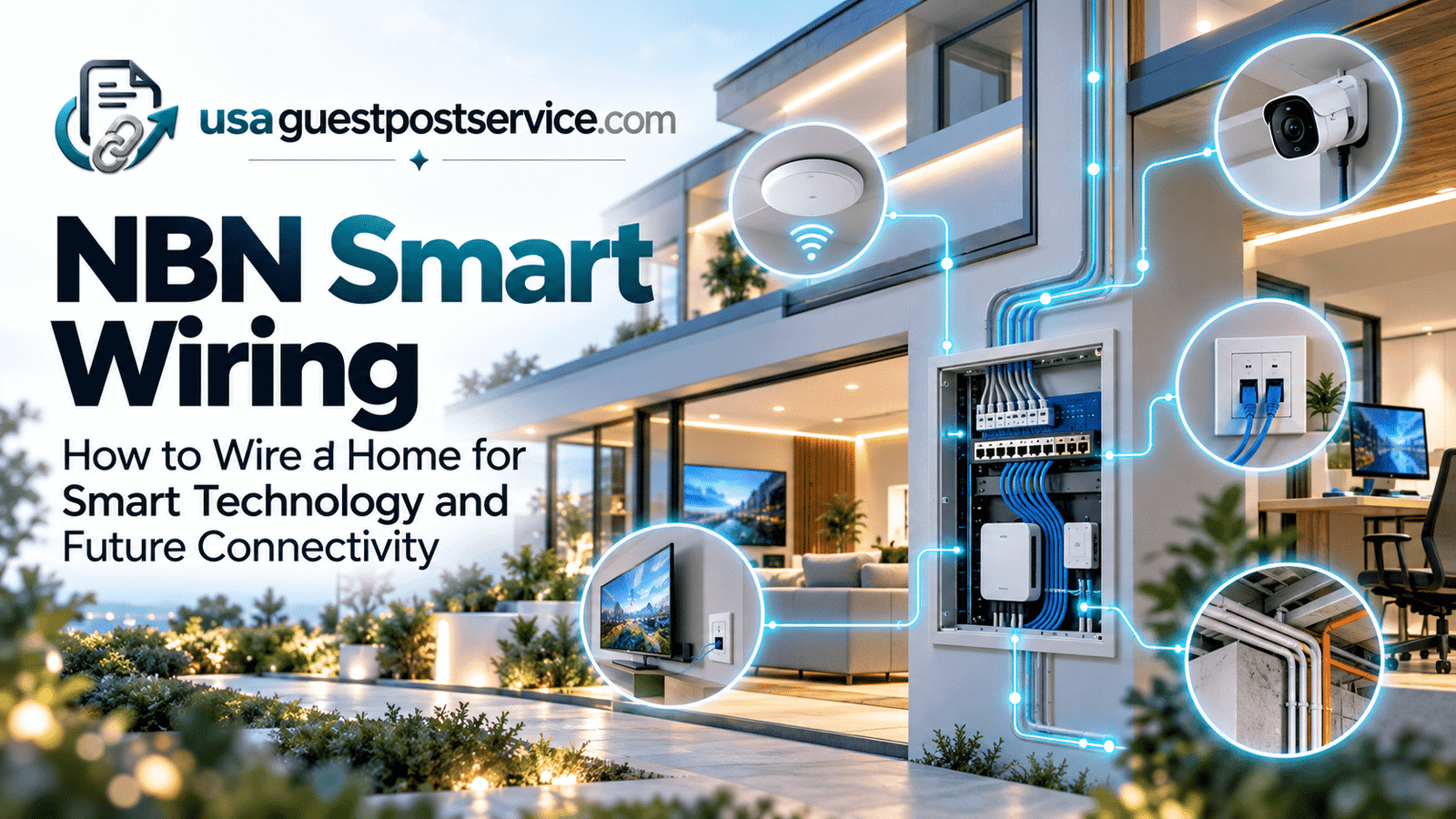
For this guide, “NBN smart wiring” refers to the structured in-home communications cabling used to distribute internet, data, media, and connected-home services from the property’s NBN connection and network equipment to the rooms and devices that need them.
It is different from ordinary electrical wiring. Electrical wiring supplies power, while smart wiring typically focuses on communications infrastructure such as Ethernet cabling, data outlets, network equipment locations, access-point cabling, camera connections, and pathways for future technology.
For new homes and major renovations, this planning is often easiest before walls and ceilings are finished. NBN recommends planning structured cabling during the building or renovation stage and specifically recommends CAT 6 cabling or above as a future-ready minimum for new homes.
Smart wiring does not eliminate the need for Wi-Fi. Instead, a well-planned wired foundation can support wireless access points, fixed devices, smart-home controllers, security equipment, and other connected systems more reliably.
This guide explains what NBN smart wiring means in practical terms, what should be considered when wiring a new or renovated home, how a smart wiring panel fits into the design, what affects cost, and how to make the infrastructure more adaptable for future technology.
What Is NBN Smart Wiring?
NBN smart wiring generally refers to the internal communications cabling used to distribute connectivity through a property after the NBN connection reaches the premises.
A simple way to understand the relationship is:
NBN Connection → Router or Network Equipment → Structured Cabling → Rooms and Connected Devices
The NBN connection provides access to the external broadband network, while the homeowner’s internal cabling helps distribute connectivity within the property.
That internal infrastructure may include Ethernet cabling, wall outlets, patch panels, network switches, access-point cabling, camera cabling, hubs, controllers, and a central equipment location.
nbn distinguishes customer cabling inside the premises from the nbn network itself. Its guidance notes that customer cabling can connect electronic devices or other equipment located away from the NBN equipment position and can support a wired home network.
Smart wiring should not be understood as one specific product or cable.
It is a planning approach that considers where connected devices are likely to be used and installs suitable pathways or cabling before those connections become difficult or expensive to add later.
How Smart Wiring Supports a Modern Smart Home
Smart-home devices need both power and communication.
Some communicate wirelessly. Others can benefit from wired data connections. Certain devices may also rely on hubs, controllers, switches, or access points that themselves need reliable network connections.
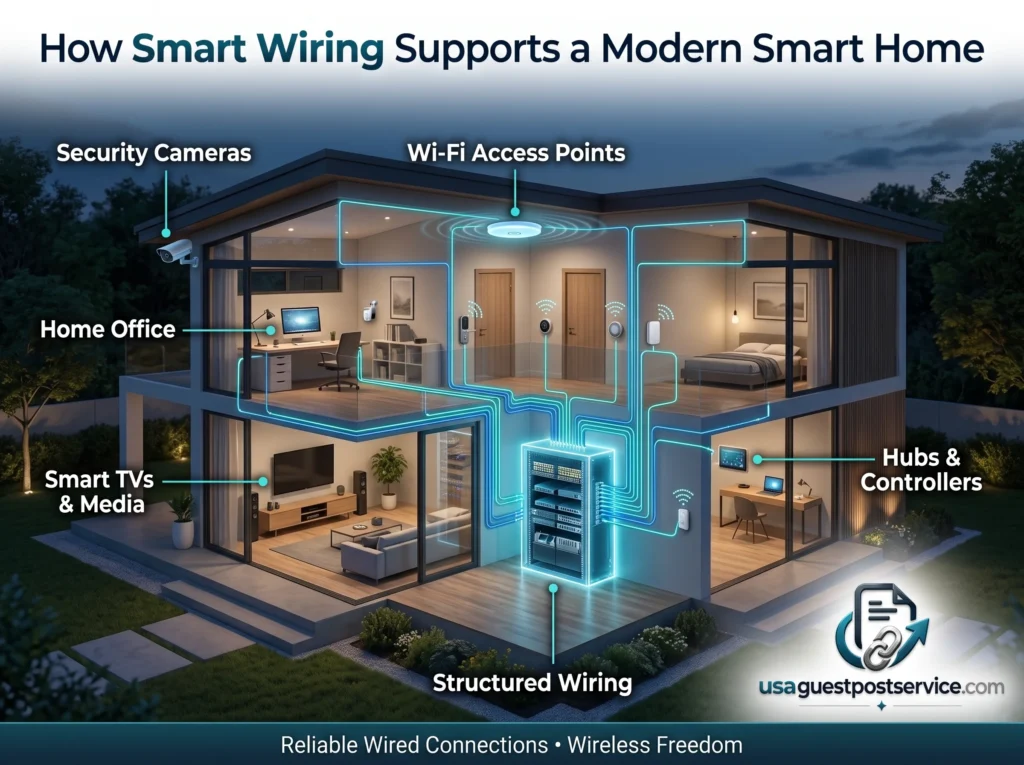
Smart wiring provides the physical communication layer behind many of these systems.
For example, structured Ethernet cabling can support:
- smart TVs and media equipment
- desktop computers and home-office equipment
- wireless access points
- wired security cameras
- smart-home hubs and controllers
- control panels
- network switches
- selected appliances or other fixed connected devices
NBN recommends data cabling to wall sockets elsewhere in the premises and identifies wired home networking as one practical use of customer cabling.
The goal is not to connect every smart device with a cable.
Many sensors, switches, locks, and other products are designed for wireless communication.
Instead, smart wiring creates a stable backbone for the parts of the connected home that benefit most from fixed infrastructure.
What Should Be Included in a Smart Home Wiring Plan?
A useful smart wiring plan begins with the locations where people will actually use technology.
Instead of installing data points randomly, homeowners should think about fixed devices, access points, entertainment locations, security equipment, workspaces, and future expansion.
Ethernet and Data Cabling
Ethernet cabling is one of the most useful parts of structured smart-home wiring.
For new homes, NBN currently recommends CAT 6 cabling or above as a future-ready minimum for structured data wiring. The appropriate cable and installation method still depend on the property, equipment requirements, and applicable cabling standards.
Ethernet can provide a stable network path between a central network location and individual rooms or fixed devices.
Common locations for data outlets may include:
- home offices
- entertainment rooms
- living areas
- bedrooms where fixed network access is likely
- network equipment locations
- access-point locations
- security camera locations
NBN recommends planning structured cabling from the NBN connection location to a central point and then using data cabling to other parts of the home where wired connections are needed.
The correct number of data points depends on the home.
Installing an outlet in every possible location is not automatically necessary. It is usually better to prioritise places where fixed equipment is likely to remain for years.
Wiring for Wireless Access Points
Wi-Fi still depends on physical network infrastructure in many larger or more demanding homes.
A wireless access point can extend coverage to areas where a single router cannot provide a strong signal.
When practical, access points can be connected back to the wired network using Ethernet rather than relying entirely on wireless backhaul.
NBN’s current building and renovation guidance recommends considering ceiling- or wall-mounted access points in multiple zones and structured cabling to support stronger whole-home coverage.
Potential access-point locations should therefore be considered before ceilings are closed.
A ceiling or centrally located data run can provide more flexibility later than trying to retrofit cabling after the home is finished.
Smart TV and Entertainment Wiring
Entertainment areas often contain several connected devices.
A television location may eventually include:
- a smart TV
- streaming equipment
- a game console
- an AV receiver
- media servers or other networked equipment
Planning power and data connections together can reduce visible cables and reliance on temporary wiring.
A wired Ethernet connection can also provide a stable option for fixed entertainment devices where Wi-Fi performance is inconsistent or unnecessary.
Security Camera Wiring
Security cameras are another important pre-wiring consideration.
Some cameras rely on Wi-Fi, while others use wired network connections and may receive both data and power through compatible infrastructure.
Planning camera locations before construction is completed can make it easier to provide hidden cable routes to entrances, driveways, exterior areas, and other intended monitoring points.
This section should be viewed as infrastructure planning rather than a complete security-system design.
Camera placement, privacy, power requirements, recording systems, and local rules may require separate consideration.
Smart Home Controllers and Control Panels
A larger smart home may include hubs, controllers, or control panels that coordinate multiple connected technologies.
These devices often work best when their locations have reliable power and network access.
Some may be installed near the central wiring cabinet, while others may need to be placed in accessible household locations.
The important planning question is not which controller to buy.
It is whether the intended equipment location has the necessary data, power, ventilation, and accessibility to support the system properly.
Sensors and Automation Pre-Wiring
Many modern sensors are wireless, but some homes may still benefit from pre-wiring for selected alarm, door, window, occupancy, or automation functions.
This can be particularly relevant in new construction where cable pathways are easy to provide before walls are finished.
Conduit can also be valuable where the exact future technology is unknown.
Instead of trying to predict every future device, a flexible pathway can make later upgrades easier.
Smart Home Wiring Panel and Central Equipment Location
One of the most useful elements of a structured wiring design is a central location where network cabling terminates.
This may be called a structured wiring panel, communications cabinet, home network centre, or network rack depending on the design.
A central equipment area may contain:
- patch panels
- network switches
- router-related equipment
- hubs or controllers
- nbn equipment where appropriate
- power outlets
- cable management
- spare space for future equipment
The location should be practical rather than merely hidden.
Important considerations include accessibility, ventilation, power availability, cable routing, and room for expansion.
Placing all communications equipment in a sealed cupboard can create heat or wireless-performance problems.
NBN recommends positioning residential gateways or modems centrally where practical and away from cupboards or appliances that can interfere with wireless performance.
The exact layout will depend on the property’s NBN technology and network design.
How to Wire a New Home for Smart Technology
Wiring a new home for smart technology should begin with planning rather than with individual gadgets.
The objective is to create useful communication pathways that can support both current and future devices.
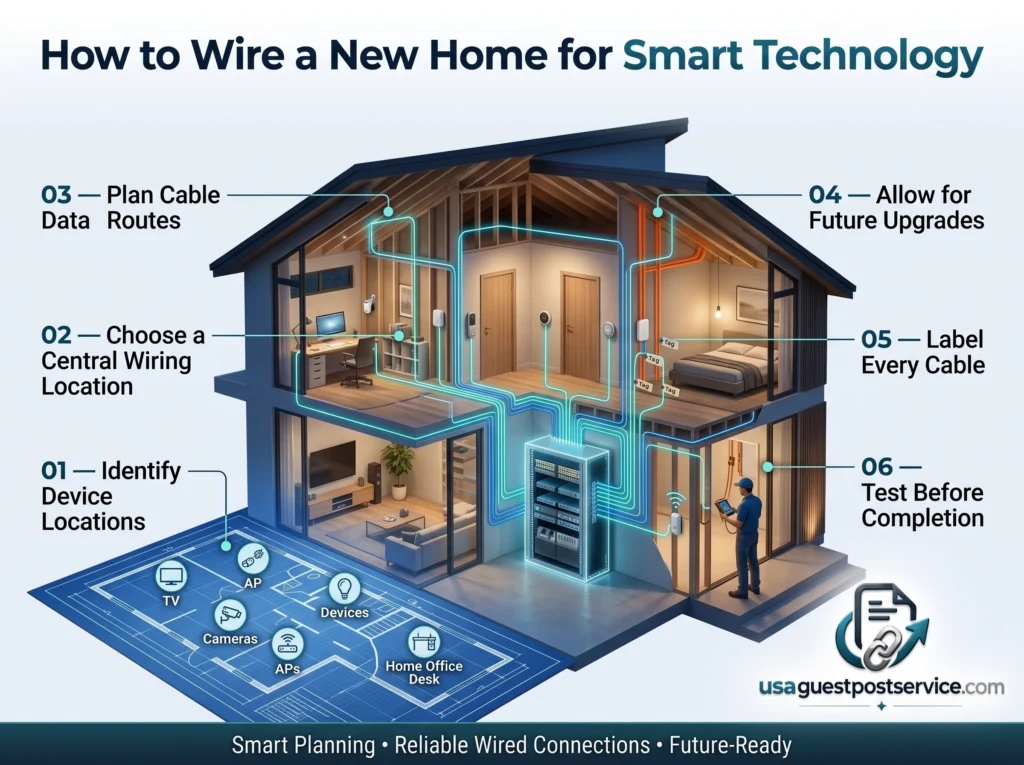
Step 1: Identify Fixed Device Locations
Start with technology that is likely to stay in predictable locations.
Examples include:
- televisions
- office desks
- wireless access points
- security cameras
- control panels
- network equipment
- entertainment systems
Marking these locations on the building plan makes it easier to decide where data cabling is actually useful.
Step 2: Choose a Central Wiring Location
Select a practical location where data cables can terminate.
This should provide enough room for network equipment, patching, power, and future additions.
The location should also remain accessible after the home is completed.
Step 3: Plan Cable Routes Before Walls Close
Running cables is usually simpler during construction or a substantial renovation because wall and ceiling spaces are accessible.
Plan routes from the central location to required outlets, access points, cameras, and other fixed devices.
This is also the stage to consider where conduit may help provide future flexibility.
Step 4: Add Extra Data Points or Conduit Where Practical
It is difficult to predict exactly how technology will change.
Instead of over-wiring every wall, focus on likely long-term use areas and consider spare conduit or additional pathways where future upgrades are realistic.
Good candidates may include:
- home offices
- entertainment areas
- ceiling access-point locations
- camera locations
- rooms likely to change function later
Step 5: Label and Document Cable Runs
Every cable should be identifiable at both ends.
Clear labels reduce confusion during installation, troubleshooting, and future upgrades.
A simple wiring plan showing outlet numbers and cable destinations can save significant time later.
Step 6: Test Cabling Before Completion
Cabling should be tested before wall finishes and cabinetry make access difficult.
Problems are much easier to correct while construction is still open.
Where regulated telecommunications cabling is involved in Australia, the work must comply with applicable cabling rules and be carried out by a registered cabler or by an unregistered person under the direct supervision of an appropriately registered cabler.
For readers moving from wiring infrastructure into broader device and system planning, our guide on how to set up a smart home covers the wider implementation process separately.
Smart Wiring for New Construction vs Existing Homes
Smart wiring can be added to both new and existing homes, but the practical challenges are different.
| Area | New Construction | Existing Home |
| Cable access | Easier before walls and ceilings close | May require retrofit pathways |
| Planning flexibility | High | More limited by finished surfaces |
| Installation disruption | Usually lower during construction | May involve cutting or accessing finished areas |
| Future conduit | Easier to include | May be difficult in some areas |
| Data-point placement | Can be planned from the start | Often based on accessible cable routes |
| Cost factors | Easier access may reduce labour complexity | Retrofit access may increase labour |
New construction provides the best opportunity to think ahead because cables and conduit can be installed before internal finishes are complete.
Existing homes are more constrained, but that does not mean a useful wired network is impossible.
Existing roof spaces, under-floor access, service pathways, garages, cupboards, or selectively opened walls may provide retrofit options depending on the property.
The best solution should balance usefulness against disruption and cost.
Wired vs Wireless Smart Home Connections
Smart wiring and wireless technology should not be treated as competing approaches.
Most modern connected homes use both.
Wired connections are particularly useful for fixed infrastructure and devices that benefit from consistent connectivity.
Wireless connections are valuable for devices that move, use batteries, or are difficult to cable.
A practical hybrid design may use:
- Ethernet for access points
- Ethernet for TVs and office devices
- wired connections for selected cameras
- wired network connections for hubs or controllers
- Wi-Fi for portable devices
- other wireless technologies for sensors and low-power smart-home products
The network design behind these connections is a separate topic.
For readers who want to understand routers, Wi-Fi, hubs, connectivity, and device communication in more detail, our smart home network guide focuses specifically on that communication layer.
How Much Does Smart Wiring Cost?
There is no single price for smart wiring because the scope of work can vary substantially from one property to another.
A small new-build cabling plan with a few data points is very different from a larger whole-home design involving multiple access points, cameras, entertainment rooms, control equipment, and extensive structured cabling.
The main cost factors include:
- number of data outlets
- number and length of cable runs
- property size
- new construction versus retrofit work
- access to walls, ceilings, roof spaces, or floors
- number of camera locations
- access-point cabling
- wiring cabinet or rack requirements
- patch panels and network equipment
- conduit requirements
- cable type
- labour
- termination and testing
- documentation and labelling
New construction can sometimes make cabling easier because installers have access before walls are completed.
Retrofit projects may require more labour because routes have to work around finished surfaces.
Because actual pricing depends on the property and installation scope, homeowners should obtain a project-specific quote rather than relying on a generic per-home figure.
Is Smart Wiring Worth It?
Smart wiring can be worthwhile when it supports real connectivity needs and reduces the difficulty of adding fixed infrastructure later.
Potential advantages include more stable connections for fixed devices, better support for wireless access points, cleaner equipment organisation, easier expansion, and less dependence on a single Wi-Fi location.
It can be particularly valuable in:
- new homes
- substantial renovations
- home offices
- properties with multiple entertainment areas
- homes using wired cameras
- larger properties needing several wireless access points
- houses expected to use extensive connected-home technology
However, more wiring is not automatically better.
Installing large numbers of unused data points increases cost without necessarily creating additional value.
The goal should be to wire likely long-term locations and provide flexible pathways where future needs are uncertain.
Common Smart Wiring Mistakes to Avoid
Smart wiring problems often come from planning decisions rather than the cable itself.
One common mistake is designing only for the devices currently in the house.
Technology changes, rooms change purpose, and new equipment may be added later.
Another mistake is creating a central wiring location that is too small, inaccessible, poorly ventilated, or short on power.
Other common issues include:
- too few data points in high-use locations
- no planned access-point cabling
- no cable routes for likely camera positions
- cables that are not labelled
- no documentation of cable destinations
- no spare capacity for expansion
- assuming Wi-Fi speed alone solves every connectivity problem
- placing networking equipment in unsuitable enclosed spaces
A good plan does not attempt to predict every technology that will ever exist.
It simply reduces avoidable limitations.
How to Future-Proof Home Wiring
No home wiring system can be permanently future-proof because technology standards and household needs continue to change.
A better goal is to make the infrastructure future-ready and adaptable.
Provide Useful Conduit
Conduit can provide a pathway for future cables where access may otherwise become difficult.
It is especially useful between important equipment locations and areas likely to need upgrades.
Leave Space in the Wiring Cabinet
A communications cabinet that is already full on the day the house is completed leaves little room for future switches, controllers, patching, or other equipment.
Allowing reasonable spare space can simplify upgrades.
Plan Extra Data Points Strategically
Extra outlets are most useful in locations where future fixed devices are realistic.
An additional office or entertainment data point may be useful.
Installing several unnecessary points in every wall usually is not.
Pre-Wire Likely Access-Point Locations
Wireless technology will continue to evolve, but wireless access points still need suitable placement.
Providing Ethernet to strategic ceiling or central locations gives future network equipment more flexibility.
Consider Camera Locations Early
Exterior camera cabling can be difficult to add cleanly after construction.
If cameras are likely, planning cable routes during building work can reduce later disruption.
Keep Documentation
A labelled diagram showing cable routes, outlets, and termination points is valuable even years after construction.
Future technicians or homeowners can understand the system without tracing every cable again.
Important Safety and Installation Considerations
Permanent telecommunications cabling in Australian homes is regulated.
Under the Telecommunications (Cabling Provider) Rules 2025, regulated customer cabling work must be carried out by a registered cabler or by an unregistered person under the direct supervision of an appropriately registered cabler. The work must also comply with applicable wiring requirements, including AS/CA S009:2020.
nbn also states that in-home cabling for the nbn network must be completed by registered cablers using its applicable guidelines.
For homeowners, the practical lesson is simple:
Do not treat permanent communications wiring as an improvised DIY project.
Plan the required outlets, equipment locations, cable routes, and future pathways, then have regulated work completed appropriately.
This is particularly important in new construction, where communications cabling may share building spaces with electrical, security, fire, and other services.
Frequently Asked Questions About NBN Smart Wiring
What is NBN smart wiring?
For the purposes of this guide, NBN smart wiring means the internal structured communications cabling used to distribute internet and network connectivity from the home’s NBN and network equipment to rooms, outlets, and connected devices.
It may include Ethernet cabling, data sockets, network cabinets, access-point cabling, camera cabling, and related infrastructure.
How do you wire a house for a smart home?
Start by identifying fixed devices and likely technology locations, choose a central network location, plan Ethernet and other communication pathways, provide outlets or conduit where useful, label all cable runs, and test the infrastructure before construction is completed.
Permanent regulated telecommunications cabling in Australia should be completed by a registered cabler or under the direct supervision of one in accordance with the applicable rules.
What wiring should a new smart home have?
There is no universal list for every home.
Typical priorities include Ethernet to offices, entertainment areas, access points, selected security cameras, controllers, and other fixed network devices.
For new homes, NBN currently recommends CAT 6 cabling or above as a future-ready minimum for structured data cabling.
The best design depends on the property’s size and intended technology.
Do smart homes need Ethernet wiring?
Not every smart device needs Ethernet.
Many devices are designed for Wi-Fi or other wireless communication.
However, Ethernet can provide a stable connection for fixed devices such as access points, TVs, office equipment, hubs, controllers, and compatible cameras.
Is smart wiring worth it?
It can be worthwhile when it supports devices that benefit from fixed connectivity or when cabling will be difficult to add later.
The value is usually highest in new builds, major renovations, home offices, larger homes, and properties with multiple fixed connected systems.
How much does smart wiring cost?
There is no single standard cost.
Pricing depends on the number of cable runs and outlets, property size, new-build versus retrofit access, equipment cabinet requirements, cable type, camera and access-point locations, labour, termination, and testing.
Can smart wiring be added to an existing house?
Yes.
The difficulty depends on the property’s construction and available cable routes.
Roof spaces, under-floor areas, existing conduits, garages, and accessible wall cavities may make retrofitting easier.
Should I wire every room with Ethernet?
Not necessarily.
A better approach is to prioritise locations where fixed network devices are likely to be used and consider additional outlets or conduit in rooms where future changes are realistic.
Conclusion: Plan Smart Wiring Around Long-Term Connectivity
NBN smart wiring provides the physical communications foundation that can support reliable internet distribution, network equipment, wireless access points, security cameras, entertainment systems, smart-home controllers, and other connected technology.
The strongest designs are not necessarily the ones with the most cables.
They are the ones that place useful connections where technology is likely to be used, centralise equipment sensibly, allow room for expansion, and provide flexible pathways for future changes.
For new construction and major renovations, planning early can make a significant difference because structured cabling, data outlets, access-point locations, camera runs, and conduit can be considered before walls and ceilings are finished.
For existing homes, selective upgrades can still improve connectivity without rewiring every room.
The goal is not to predict every future smart-home technology. It is to create a reliable, manageable, and adaptable wiring foundation that can support the way the home is used today while making future upgrades easier.