

Alexa smart home devices are connected products that you can control through Amazon Alexa using compatible Echo devices, the Alexa app, voice commands, or supported automation routines. Common examples include smart lights, plugs, thermostats, security cameras, doorbells, locks, and connected appliances. The right setup depends on device compatibility, your preferred control method, network requirements, and the household tasks you want to automate.
You do not need to purchase an entire smart home system at once. Starting with a few compatible products can make everyday tasks easier while helping you understand how Alexa and smart home technology work together. Before buying devices, it is important to distinguish between products that work directly with Alexa, devices that need an additional hub, and products that support only certain features through the Alexa ecosystem.
What Are Alexa Smart Home Devices?
Alexa smart home devices are connected household products that integrate with Amazon’s Alexa platform to provide supported controls, monitoring, or automation. Depending on the product, users may be able to turn lights on or off, adjust a thermostat, check a camera, operate a compatible lock, or activate a routine through voice commands or an app.
These products generally fall into two categories. Alexa-enabled devices provide access to Alexa itself, while Alexa-compatible smart home products are designed to be controlled through Alexa even if they do not have a built-in voice assistant.
For example, an Echo smart speaker can provide voice control, while a compatible smart bulb adds connected lighting to the home. When the two are configured correctly, you may be able to control the bulb by speaking to Alexa rather than opening its separate application.
The distinction matters because not every smart device contains Alexa, and not every connected product supports the same Alexa functions. Compatibility depends on the product model, supported integrations, setup requirements, and available features.
How Does Alexa Work With Smart Home Devices?
The relationship between Alexa and smart home devices involves three basic elements: compatible equipment, a supported connection method, and a way to send commands or create routines.
First, a compatible device connects to Alexa through the Alexa app, a supported smart home skill, a compatible Echo device, or an appropriate hub or bridge. The exact method depends on the product.
Next, Alexa makes the supported device controls available through the relevant interface. A user may issue a voice command, change a setting in the Alexa app, or activate an automation routine.
Finally, the connected device responds according to its supported functions and current operating conditions.
For example, a user might say, “Alexa, turn on the living room lights.” If the relevant lights are connected, available, and correctly named, Alexa can send the appropriate command.
More advanced setups can combine compatible products into routines. A single command might adjust selected lights and perform another supported action, reducing the need to control every device individually.
However, the availability of remote access, voice control, and automation differs between products. Some devices require an internet connection or manufacturer account, while others support certain functions locally.
What Types of Smart Home Devices Work With Alexa?
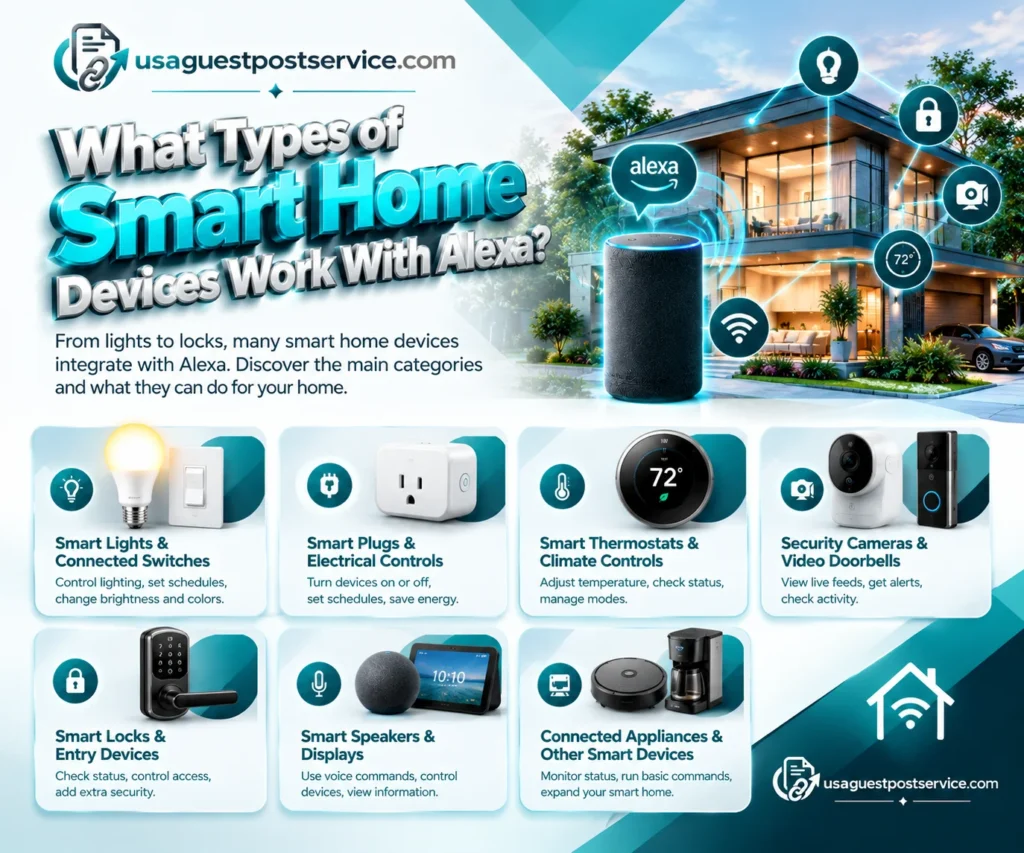
Many household product categories support Alexa integration, but the available controls vary by manufacturer and model. The following categories are useful starting points when planning an Amazon Alexa home setup.
Smart Lights and Connected Switches
Smart lighting is one of the simplest ways to begin building an Alexa-controlled home.
Alexa-compatible light bulbs, switches, dimmers, and lighting systems may support voice control, schedules, grouping, and brightness adjustments. Compatible color-changing bulbs may also offer color controls through supported commands or applications.
For example, you could create a group called “Living Room Lights” and use a voice command to switch compatible lights on or off together. You might also schedule selected lights to turn on in the evening.
Before purchasing, check whether the light requires a hub, whether the existing fixture and switch arrangement are supported, and which controls are available through Alexa.
Smart Plugs and Electrical Controls
Smart plugs connect compatible electrical equipment to a supported control system. Depending on the model, they may let you turn a suitable lamp or another approved appliance on or off using Alexa, an app, or a schedule.
These devices can provide an accessible introduction to home automation because they may not require replacing the connected appliance.
However, a smart plug does not make every appliance fully smart. It typically controls power rather than providing access to all of an appliance’s individual functions. Some equipment should not be connected to smart plugs because of its electrical characteristics, power requirements, or manufacturer restrictions.
Always check the product’s rated capacity and intended use before connecting electrical equipment.
Smart Thermostats and Climate Controls
Compatible smart thermostats allow users to manage selected heating and cooling settings through Alexa. Depending on the thermostat, this may include changing the temperature, checking the current setting, or adjusting a supported operating mode.
Climate control devices can be helpful when household schedules change or when users want convenient access to temperature settings without interacting with a wall-mounted control.
Compatibility must be confirmed before purchase. A thermostat may support Alexa but still be unsuitable for a particular HVAC system, wiring arrangement, or desired control function.
Energy savings are not guaranteed. Actual results depend on the heating and cooling equipment, property conditions, programmed settings, climate, and household behavior.
Smart Security Cameras and Video Doorbells
Alexa-compatible security cameras and video doorbells can provide access to supported monitoring features. Depending on the camera, connected display, and integration, users may be able to view a live feed, receive supported announcements, or check activity through compatible devices.
Some systems may allow a camera feed to appear on a compatible Echo device with a screen. Others may require a particular manufacturer skill, account connection, or application.
Before buying, check the exact camera model, supported Echo devices, video features, notification options, and any subscription requirements.
Camera compatibility should not be confused with complete security integration. A camera may work with Alexa for viewing but not support every recording, detection, or automation feature available in its own application.
Smart Locks and Entry Devices
Compatible smart locks can provide selected access controls through an Alexa integration. Depending on the product and permissions, users may be able to check a lock’s status or control supported functions.
Security-related actions require additional care. Some functions may require confirmation, a PIN, specific authorization, or other safeguards. Never assume a voice assistant can perform every lock operation simply because the product is listed as compatible.
Review the lock’s security settings, supported commands, backup access method, and manufacturer instructions before connecting it to a voice-controlled system.
Smart Speakers and Displays
Echo smart speakers and displays serve as common Alexa control interfaces. They can provide voice interaction and manage compatible connected products through supported commands and routines.
A compatible smart display may also show supported camera feeds or device information. The available features depend on the particular model, software, and connected products.
An Echo speaker or display is not automatically a smart home hub. Some Echo models include built-in smart home connectivity features, while others primarily provide voice control and require compatible devices or additional equipment for certain connections.
Connected Appliances and Other Smart Devices
Some compatible appliances and household products can be controlled or monitored through Alexa integrations. Examples may include robotic vacuums, selected kitchen appliances, entertainment devices, and certain environmental sensors.
The integration may provide only a limited set of functions. For instance, a connected appliance might support status updates or a few commands without exposing all settings available in its own app.
Look beyond a product’s smart features and ask whether its Alexa integration supports the tasks you actually intend to perform.
Alexa-Compatible Devices at a Glance
| Device Category | Common Alexa Uses | What to Verify |
| Smart lights | On/off control, dimming, supported color settings | Bulb or switch compatibility, hub requirements |
| Smart plugs | Power control and schedules | Electrical ratings and intended use |
| Thermostats | Supported temperature and mode adjustments | HVAC compatibility and supported commands |
| Cameras and doorbells | Supported announcements and live views | Model, display support, subscriptions |
| Smart locks | Supported status checks and access controls | Security requirements and permissions |
| Sensors | Supported alerts and automation triggers | Compatible controller, routines, battery life |
| Connected appliances | Selected commands or status information | Exact features offered through Alexa |
This comparison can help narrow your choices, but the product’s current specifications should always take priority over general category descriptions.
What Is an Alexa Smart Home Hub?
An Alexa smart home hub is a compatible controller or built-in hub feature that helps connect and manage certain smart devices. It is important to distinguish an Echo device that includes a built-in hub from one that provides Alexa voice control without the same hub capabilities.
Some smart home devices communicate through technologies such as Zigbee rather than connecting directly to a standard Wi-Fi network. A compatible hub can provide the connection required to bring those devices into the wider smart home system.
Certain Echo models include built-in smart home hub functionality. However, not all Echo devices have the same hardware or support the same communication technologies.
A dedicated hub, manufacturer bridge, or compatible controller may still be necessary for some products. Other devices can connect directly through supported Wi-Fi or other connection methods.
Before purchasing a hub or Echo device for this purpose, check the exact model’s supported technologies and the requirements of the smart products you plan to add. Do not assume that every Echo product can act as a Zigbee hub or Thread border router.
If you are comparing centralized controls and compatible equipment, this guide to the smart home control panel explains how a control interface can help manage connected systems.
How to Connect Smart Home Devices to Alexa
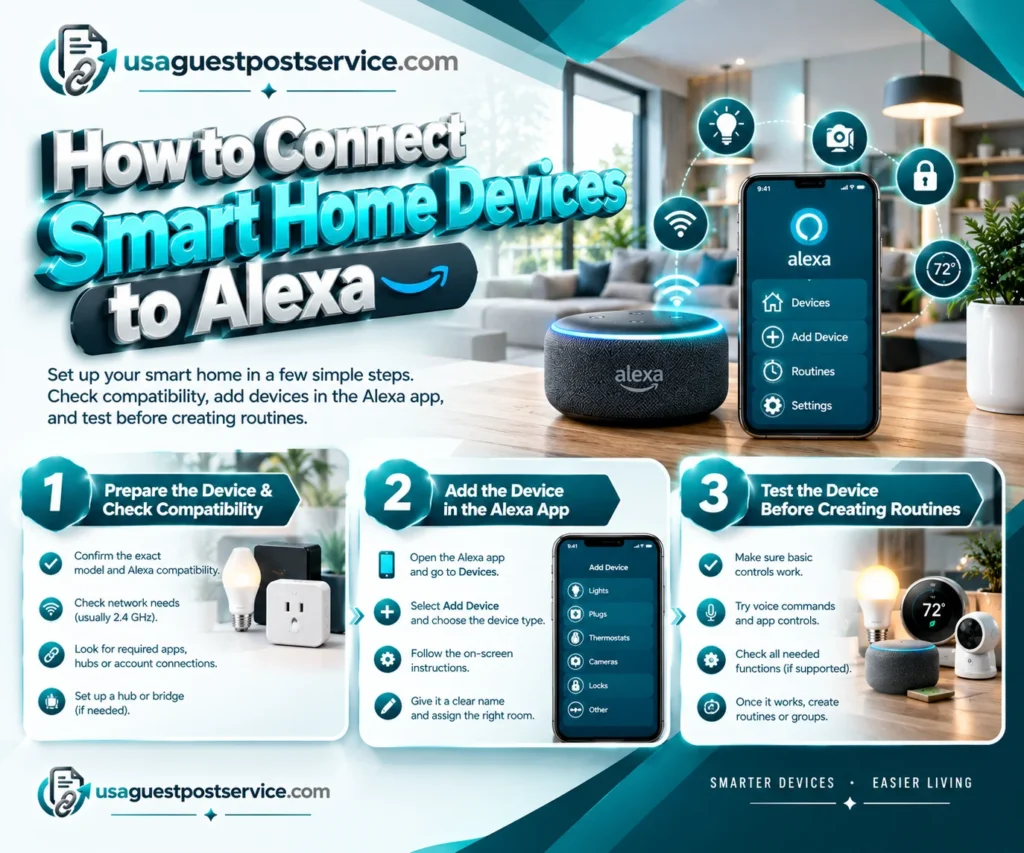
The setup process depends on whether the device connects directly, requires a manufacturer’s application, or uses a hub or bridge. For many compatible products, the Alexa app provides the main setup interface. For device-specific instructions, follow Amazon’s official guide to connect smart home devices to Alexa before completing the setup.
Prepare the Device and Check Compatibility
Start by identifying the exact product model and confirming its Alexa compatibility. Check the manufacturer’s instructions for required apps, hubs, account connections, network bands, and setup codes.
Many Wi-Fi smart home devices support 2.4 GHz networks, although requirements vary by product. Some devices require a particular network configuration or must be connected to a manufacturer account before they can be discovered by Alexa.
If the product requires a hub or bridge, set up that equipment according to the manufacturer’s instructions before adding it to Alexa.
Add the Device in the Alexa App
For a typical supported device, open the Alexa app and navigate to Devices, select the option to add a device, choose the appropriate device type, and follow the on-screen instructions.
The exact prompts may vary by product. Some devices are discovered automatically, while others need a manufacturer skill, account linking, or a separate setup step.
After the device has been added, give it a clear name and assign it to the correct room where the app supports those options.
Names such as “Kitchen Light” or “Front Door Camera” are easier to recognize than generic device names, especially when several products have similar functions.
Test the Device Before Creating Routines
First, confirm that the basic device controls work as expected. Check that the device responds through the Alexa app and any supported voice commands.
If the product supports only a limited set of Alexa functions, test the functions you actually need rather than assuming the full manufacturer app is available through voice control.
Once the device works reliably, you can begin creating routines or grouping compatible products.
For a broader walkthrough of network preparation, device selection, configuration, and testing, see the complete smart home setup guide.
How to Create Alexa Smart Home Automation Routines
Alexa home automation devices become more useful when compatible products can work together through routines. An Alexa Routine groups one or more supported actions and allows them to run after a chosen trigger or event.
A trigger may be a voice phrase, a schedule, an alarm, or another supported event. The options available depend on the devices and features in your Alexa setup.
For example, a morning routine might turn on selected lights and provide a weather briefing. An evening routine could dim compatible lights and perform another supported action. These are examples of possible configurations, not functions guaranteed on every device.
Create a Routine in the Alexa App
Open the Alexa app and find the Routines section. Create a new routine, choose the event that should trigger it, and add the actions you want Alexa to perform. Review the available settings and save the routine.
The interface and available options can change, so follow the instructions presented in your current app version.
Before creating a complicated routine, start with one or two compatible devices. Confirm that the trigger works, the correct devices respond, and manual controls remain available.
Examples of Useful Alexa Automation
Lighting routines
Schedule compatible lights to turn on or off at selected times, or create a voice command that controls a supported group of lights.
Comfort routines
Use supported thermostat controls and schedules to make temperature adjustments more convenient. The available controls depend on the thermostat and HVAC system.
Security-related routines
Use supported announcements, notifications, or compatible device actions to improve awareness of selected events around the home.
Not every device can trigger or participate in every routine. Always review the available triggers, conditions, and actions in the Alexa app.
Avoid Conflicting Automation Rules
When several routines affect the same device, their actions can sometimes produce unexpected results. For example, one routine might turn a light on while another turns it off shortly afterward.
Use clear routine names, review existing automations before adding new ones, and test changes under realistic conditions. A small set of reliable routines is usually easier to manage than a complicated system with overlapping rules.
Do Alexa Smart Home Devices Support Matter and Zigbee?
Alexa-compatible smart home devices may use different connectivity technologies. Understanding these technologies helps you choose equipment that will work with your existing setup.
Wi-Fi: Some devices connect directly to a compatible home network. Check the product’s supported network bands and whether it requires internet access for particular features.
Zigbee: Certain smart home products use Zigbee to communicate with a compatible hub. Some Echo models include a Zigbee hub, but support varies by model. A separate compatible hub may be necessary.
Matter: Matter is an interoperability standard designed to help supported smart home products work across compatible ecosystems. Alexa can connect supported Matter devices through the Alexa app, subject to the required controller and device capabilities.
Thread: Thread is a networking technology used by certain low-power connected devices. A Thread-based Matter setup may require a compatible Thread-enabled controller or border router.
These technologies are not interchangeable. A product supporting Wi-Fi does not automatically support Zigbee or Thread, and Matter compatibility alone does not guarantee that every feature will work with every Alexa device.
Before purchasing, confirm the exact model, its supported connectivity methods, any required hub or bridge, and the functionality available through Alexa.
How to Choose the Best Smart Home Devices for Alexa
The best Alexa-compatible products are those that address a real household need and work reliably with your preferred setup. Instead of selecting devices based solely on popularity or their number of features, evaluate compatibility, usability, cost, and ongoing support.
Define Your Main Goal
Start by deciding what you want to improve. You might want voice-controlled lighting, more convenient thermostat adjustments, better awareness of activity around an entrance, or scheduled control for a suitable appliance.
Your goal helps determine which device category to consider first.
For beginners, a small setup with compatible lighting or a smart plug can provide an opportunity to learn the basics. Security-focused households may prioritize supported cameras, doorbells, locks, or sensors instead.
Check Compatibility Before Buying
Read the official product specifications and confirm that the exact model works with Alexa. Check whether it needs a hub, a separate manufacturer app, an account connection, a subscription, or a compatible Echo device.
Also verify which functions are supported. Basic on/off control may be available when advanced settings or detailed device information remain accessible only through the manufacturer’s app.
If you plan to connect products from different manufacturers, confirm that the specific devices and intended automations are supported together.
Compare the Total Cost
The purchase price may not represent the entire cost of a connected home. Depending on the setup, additional expenses can include a hub, bridge, batteries, installation, subscriptions, or replacement equipment.
Consider these costs alongside product reliability, supported features, warranty conditions, and the manufacturer’s software-support policy.
A less expensive product may be a reasonable choice if it performs the required tasks reliably. A more expensive model is not automatically the better option.
Consider Future Expansion
If you plan to add more Alexa home automation devices, think about which device categories you may want in the future.
Check whether your preferred platform supports the additional products, whether the network can accommodate the setup, and whether a hub or controller will be needed.
A small, compatible system that can expand gradually is often easier to maintain than an assortment of devices selected without a plan.
For more detailed planning around device selection, controller requirements, and installation considerations, consult the smart home installation and setup guide.
Privacy and Security for Alexa and Smart Home Devices
Connected devices can make everyday tasks more convenient, but their privacy and security settings deserve attention. Alexa-enabled products may interact with accounts, voice commands, cameras, sensors, or other household information, depending on their capabilities.
Review Voice and Recording Controls
Alexa-enabled devices are designed to respond to a selected wake word or supported activation method. Amazon provides privacy controls for managing certain aspects of voice interactions and recordings.
Review the available settings in your Alexa account and understand how to manage voice history, recording options, microphones, and supported privacy controls. Exact options can vary by device and software version.
For products with cameras or displays, also review video-related settings, access permissions, and who can view available feeds.
Secure Accounts and Connected Devices
Use strong, unique passwords for important accounts and enable multifactor authentication when available. Keep device software and related applications updated according to the manufacturer’s instructions.
Review which household members or other users have access to the smart home system. Remove permissions that are no longer needed, and avoid sharing administrator access unnecessarily.
Protect Access to Security Devices
Smart locks, doorbells, and cameras deserve particular care because they relate to access control or household monitoring.
Confirm the security requirements for sensitive actions, keep backup access methods available where appropriate, and review how devices behave when a network connection or service becomes unavailable.
Connected security devices can be useful, but they should not be treated as a complete replacement for appropriate physical security measures.
Understand Internet and Service Dependencies
Some Alexa smart home functions rely on cloud services or an internet connection. Other functions may continue to operate locally, depending on the product, controller, and configuration.
Before relying on a device for an important task, check the manufacturer’s documentation to understand which controls remain available during an outage.
This is especially relevant for essential home functions. Maintain suitable alternative ways to operate equipment when practical and follow any applicable product safety instructions.
Common Problems With Alexa Smart Home Devices
Connectivity, setup, naming, and compatibility issues can prevent a smart home device from responding as expected. A consistent troubleshooting process can help identify the cause without resetting the entire system.
Alexa Cannot Find a Device
First, confirm that the device is powered on and in the correct setup mode. Check its manufacturer app and follow the device’s connection instructions. Then use the Alexa app’s device-discovery process or the supported setup method.
If the device needs a skill, account link, hub, or bridge, confirm that the required step has been completed.
A Device Appears Online but Does Not Respond
Check whether the product responds through its own app or physical control. Review any error messages, network status, and account permissions.
If it works through the manufacturer app but not through Alexa, the issue may involve the integration, account connection, supported commands, or current service status.
Change one setting at a time so that you can identify what resolves the problem.
Voice Commands Control the Wrong Device
Device names that are too similar can make voice control less predictable. Use clear names, organize products by room, and review device groups in the Alexa app.
After renaming a device, test the command again and check whether another device has a similar name.
A Smart Home Routine Does Not Run
Review the routine’s trigger, conditions, selected actions, and participating devices. Confirm that any required permissions and connections are available.
Test the routine with a simple trigger and a single action before adding further steps. This can help identify whether the problem comes from the trigger, the integration, or a specific device.
A Device Requires Reconnecting
Follow the manufacturer’s recommended recovery steps before performing a factory reset. Resetting a device may remove its existing configuration or require it to be added again to the smart home system.
If connectivity or configuration problems affect several devices, investigate the network, controller, or platform before repeatedly resetting individual products.
Frequently Asked Questions
Do All Smart Home Devices Work With Alexa?
No. A product must support Alexa through a compatible integration, skill, controller, or other supported connection method. Some products work only with certain ecosystems or offer limited controls through Alexa. Check the exact model’s specifications before buying.
Does Alexa Need a Smart Home Hub?
Not always. Some devices connect directly through supported network technologies, while others require a hub, bridge, or controller. Certain Echo models include built-in smart home hub features, but the available capabilities differ by model.
Can Alexa Control Smart Devices Without Wi-Fi?
That depends on the device and its connection method. Some functions may operate locally, while others depend on Wi-Fi, internet access, or cloud services. Check the specific product’s requirements rather than assuming all Alexa features work offline.
Can Alexa Control Smart Lights and Thermostats Together?
Alexa can coordinate supported devices through routines or other available controls. The exact actions depend on device compatibility and the functions exposed to Alexa. Check the available controls in the Alexa app before designing the routine.
What Is the Difference Between Alexa-Enabled and Alexa-Compatible Devices?
An Alexa-enabled device provides access to Alexa directly, while an Alexa-compatible product is designed to work with supported Alexa controls or integrations. A smart bulb, for example, may work with Alexa without containing a built-in voice assistant.
Are Alexa Smart Home Devices Secure?
Security depends on the device, its configuration, the account controls available, and how it is maintained. Use strong passwords, enable available security features, keep software updated, and review privacy settings and user permissions regularly.
How Many Alexa Smart Home Devices Can I Connect?
There is no single practical number that applies to every setup. Limits can depend on the device, account, controller, connectivity technology, and platform features. Check the documentation for the products and ecosystem you use, and expand the system gradually.
Build a More Connected Home With Alexa
Alexa smart home devices can make lighting, climate control, monitoring, and other household tasks easier to manage when the products are compatible and configured correctly.
Start by deciding which tasks you want to simplify. Choose supported devices, confirm their connection and hub requirements, and connect them through the recommended setup process. Once basic controls work reliably, add routines that support your daily habits.
Compatibility, privacy, network reliability, ongoing cost, and software support should all be considered before expanding the system. Not every smart device needs to be connected to Alexa, and not every available feature will be useful to every household.
A practical Alexa smart home is built around reliable devices and routines that solve real problems—not simply the number of products you own.